Components of the Alarms system module
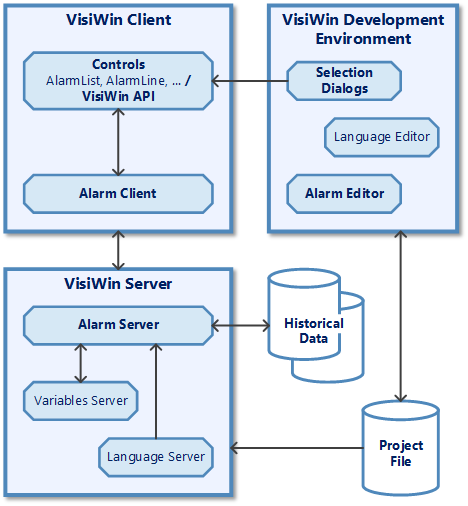
The diagram below shows the components of the Alarms system module. The components, their purpose and interconnections with other components are described below.
-
Variables server
-
The variables server provides the process data that trigger alarms.
-
-
Alarm server
-
During initialization, the alarm server reads the definitions contained in the project file. The process data that are defined as event variables and the acknowledgement variables for alarms are monitored by the variables server. This means that the alarm server is notified when one of these process values changes. Process data that are defined as state variables are written to the variables server when an alarm state changes.
The text server provides alarm texts in the current project language.
If an alarm state changes, the connected alarm clients are notified. Acknowledgments sent by a client are automatically passed on to all other clients and, if necessary, to the variables server as well.
-
-
Language server
-
The language server provides the alarm server with localizable alarm texts along with all features of dynamic texts. Localizable texts can contain process variable values and include other localizable texts as well as special formats such as date, time, etc.
-
-
Alarm client
-
The alarm client of an HMI application receives alarms from the alarm server and passes them on to the control elements. The alarm client receives acknowledgments from the control elements and forwards them to the alarm server. The alarm server then effectuates the necessary state changes. The client functions are available within the
VisiWin.Alarmnamespace.
-
-
Controls
-
Alarms can be displayed using special alarm controls. For example, the AlarmList control allows a filtered view of alarms and also includes the alarm acknowledgment function.
-
-
Project file
-
The project file contains definitions of the Alarms system module. The definitions contain information such as the relevant process value, the alarm style, and any additional operations that will be executed if the alarm occurs. At design time, definitions are edited in the alarm editor and their parameters are set on the Property Pages. At runtime, the alarm server reads the definitions from the project file. They determine the behavior of the alarm server and the application.
-
-
Alarm editor
-
The alarm editor allows to edit the Alarms system module. Definitions created by the editor are saved in the project file and determine the runtime behavior of the alarm server.
-
-
Selection dialogs
-
EASY UI Designer integrates dialogs that allow to select alarm classes and alarm groups.
-
-
Historical data
-
In addition to monitoring alarm states, the alarm server manages an alarm history database. The alarm history saves all alarm state changes.
-
Related topics: