Responsive
The responsive layout is suitable for displaying visualisations on very different client devices (e.g. desktop PC and smartphone). Due to the logic required for this, elements in this layout cannot be positioned absolutely. The menu can be flexibly expanded and collapsed using a burger icon.
The responsive layout has a menu that can be used to call up the various views. In this layout, the elements cannot be positioned absolutely due to the logic required for this.
The buttons  (user) and
  (settings) in the header refer to the server-side user management and language switching functions.
Document structure
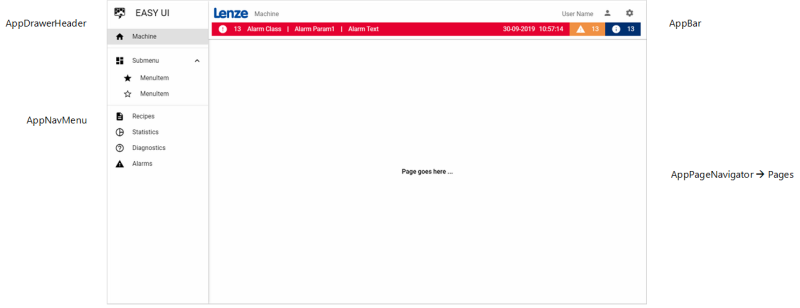
The associated main view "AppShell.html" contains the elements AppDrawerHeader, AppNavMenu, AppBar and AppPageNavigator in the document structure.
AppDrawerHeader
The AppDrawerHeader contains the Image and Label element for the menu.
AppNavMenu
The AppNavMenu contains the elements for the individual menu items.
AppBar
The AppBar contains the elements of the header.
AppPageNavigator
The AppPageNavigator displays the various pages with the actual content at runtime. Therefore, do not insert any elements in this area, but create the visualisation on the respective page, for example "MachinePage.html".
All user interfaces of the project are contained in the client folder under "Design". Double-click on an entry to open the corresponding file in the Designer workspace.
Related topics: