SegmentBar
Bar chart consisting of segments for displaying a process variable value.
|
Symbol |
|
|
Menu ribbon |
Start > Controls > Input/output > Variable output > SegmentBar |

The SegmentBar control element displays vertically arranged segments whose fill colour represents the linked numerical value of a process variable, as well as a scale with scale values. The SegmentBar is used, for example, to display an energy value.


The segments (blue) of the SegmentBar control element represent the current value of the connected process variables.
Functionalities
The control element supports the following functionality:
-
Connection to an analogue process variable(integer value/floating point value) for the data source
-
Display of scale values
-
Limitation of the displayable value range
-
Representation of the segments
-
Display of the current value and the unit in a display for value and unit
-
Display of the background, the frame, the shadow, etc.
-
Color display of the background, frame, text, etc., also depending on the status of the control element
Style
The SegmentBar is available in the following styles: Lenze.Default, LenzeCyan.Default, Custom.Default.
Structure and properties of the SegmentBar
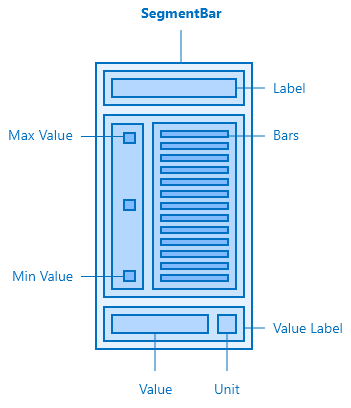
The SegmentBar and its elements
The control element contains three internal containers for the label, the bars and the scale as well as the value display.
Layout
Defines the height of the entire control element. By default, the property is set to 300 px in all styles. The width is limited to 80 px in the LenzeCyan.default.
Appearance
The appearance of the bar segments can be configured in this category. In the "Lenze.Default" style, there are 10 segments with a distance of 7 px, while the number in "LenzeCyan.Default" is 25 px, which are 5 px apart. True to the basic style of the two variants, the edges in "Lenze.Default" are rounder, in "LenzeCyan.Default" the corresponding property "BorderRadius" is set to 0 px.
Related topics: