Title
Display of a text at the top of a control element as a heading.
The heading is displayed within the graphical representation of the control element, typically at the top of the control element. The text can be defined as a constant in the control or obtained from the EASY UI Designer language switcher.
The heading is displayed in a heading display ("Title" element).
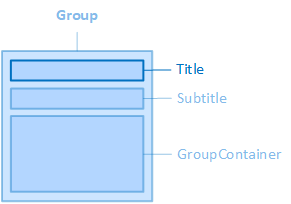
The "Title" element, for example, is contained in the "Group" control element.
The source, layout, display, paragraph and font of the heading can be configured via the properties of the "Title" category of the control, the colours of the heading via the properties of the "Colors" category.
Source
The following properties define the heading text or the source of the heading text:
TitleText
Use this property if the heading is language-independent, e.g. a name or a short description.
LocalisableTitleText
If the heading is to be language-dependent, the text selection dialogue can be opened here via the  button. This establishes the connection to an EASY UI Designer text definition. The property then saves the full name of the text definition.
-
The "LocalisableTitleText" property has priority over the property.
Layout
The layout of the heading can be configured using the following properties:
TitleHeight
Defines the height of the headline display.
TitleMargin
Defines the outer spacing of the heading display, i.e. between the edge of the heading display and its parent or neighbouring element.
TitlePadding
Defines the inner spacing of the heading display, i.e. between the edge of the heading display and its content, i.e. the actual heading text.
TitleWidth
Defines the widthof the heading display.
Representation
The following properties are available for displaying the heading:
ShowTitle
Determines whether the heading should be displayed.
Paragraph
Line breaks, line height and text alignment of the heading are configured using the following properties:
TitleLineClamp
Specifies the number of lines for the heading if the heading text is longer than the width of the heading display (TitleWidth). The property only has an effect if the "TitleTextWrapping" property is set to "WrapWithLineClamp". Line breaks are inserted instead of spaces in the heading text, i.e. there is no wrapping within a word.
TitleLineHeight
Defines the height of the text line(s) of the heading. See also CSS reference: line-height
TitleTextAlignment
Defines the horizontal alignment of the heading text within the heading display. See also CSS reference: text-align
TitleTextTrimming
Defines how the heading text is shortened if it is longer than the width of the heading display.
-
This property only has an effect for single-line text (TitleTextWrapping = NoWrap)
-
Clip
The excess text is cut off.
-
Ellipsis
The excess text is abbreviated by an ellipsis (...) (default setting).
-
Overflow
The text is displayed and may extend beyond the edge of the control element.
TitleTextWrapping
Determines whether and how the heading text is wrapped.
NoWrap
No line break, the heading text is displayed in one line. If the heading text is longer than the width of the control, the excess text is either truncated, abbreviated by an ellipsis or protrudes beyond the edge of the control, depending on the setting in the "TitleTextTrimming" property.
Wrap
If the heading text is longer than the width of the control element, the text is displayed in multiple lines. Line breaks are automatically inserted at the end of each line after a space or a hyphen.
-
If the "Width" property is set to "auto", the width of the control element adapts to the text length until its width is limited by the width of the parent container.
-
If the height of the control is smaller than the total height of the rows, rows may protrude beyond the lower limit of the control. Cutting off the lines is prevented in the RadioButtonGroup control element by setting the "Height" property to "auto" by default. In the Group, however, the width is set to 200px by default. If necessary, set the "Height" property in the Group to "auto" manually.
WrapWithLineClamp
If the text is longer than the width of the control element, the text is displayed in multiple lines. The text will contain a maximum of as many lines as specified in "TitleLineClamp". Line breaks are automatically inserted at the end of each line after a space or a hyphen. If there is excess text, an ellipsis is automatically inserted at the end of the last line. The ellipsis is inserted regardless of the setting in "TitleTextTrimming".
-
The notes for "Wrap" apply accordingly to "WrapWithLineClamp".
WrapWithWordBreak
If the text is longer than the width of the control element, the text is displayed in multiple lines. With this setting, text wrapping is also permitted within the words.
-
The notes for "Wrap" apply accordingly to "WrapWithWordBreak".
Font
The font of the heading text is configured using the following properties:
TitleFontClass
Defines the font class of the heading text.
-
The property contains a list of font classes from which one can be selected. The settings are obtained from a CSS file (fontclasses.css), which can be found in the resourcesWtypography folder in the client project directory.
TitleFontSize
Defines the font size of the heading text. See also CSS reference: font-size
TitleFontWeight
Determines how thick or thin the letters of the heading text should be displayed. See also CSS reference: font-weight
TitleTextContrast
Determines how light the heading text should be displayed, from 1 (opaque, default setting) to 0.5 (semi-transparent) to 0 (completely transparent). See also CSS reference: opacity
TitleUppercase
Specifies that the heading text is displayed in capital letters. See also CSS reference: text-transform
Related topics:
Affects these controls: