Group
Container for control elements with frame and labelling.
|
Symbol |
|
|
Menu ribbon |
Start > Controls > Container > Layout > Group |

The "Group" control element is a container for other control elements. The Group can be used to visually group control elements, e.g. by defining a heading and a frame or a background colour. Switching the group visible/invisible also automatically affects the controls it contains.
Functionalities
The Group supports the following functionality:
-
Automatic positioning of the included control elements as in FlexLayout
-
Display of a language-switchable heading in the control element
-
Display of a language-switchable subtitle in the control element
-
Connection to the user administration for blocking operability
-
Display of the background, the frame, the shadow, etc.
-
Color display of the background, frame, text, etc., also depending on the status of the control element
You can configure these functionalities via the properties in the Properties window when you select the control in the Designer or in the document outline.
Style
There are no system styles available for the layout container. You can create your own styles for the control element. These styles are available for selection in the "Style" property after creation.
Structure
The Group contains three elements: "Title", "Subtitle" and "GroupContainer". Control elements that are placed on the Group are added to the Group as sub-elements of the GroupContainer.
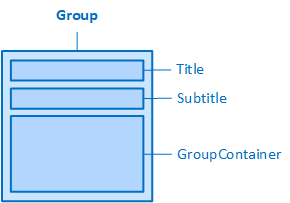
The Group and its elements
Related topics: