MC_MoveAbsolute
This FB serves to carry out a positioning to an absolute target position. After reaching the target position, the axis is at standstill if no further motion commands are pending.

|
Note!
For absolute positioning processes, the home position must be known! |
|
|
|
|
MC_MoveAbsolute |
|
|
|
|
|---|---|---|---|---|---|---|---|
|
AXIS_REF |
- |
|
Axis |
Done |
|
- |
BOOL |
|
BOOL |
- |
|
Execute |
Busy |
|
- |
BOOL |
|
BOOL |
- |
|
ContinuousUpdate |
Active |
|
- |
BOOL |
|
LREAL |
- |
|
Position |
CommandAborted |
|
- |
BOOL |
|
LREAL |
- |
|
Velocity |
Error |
|
- |
BOOL |
|
LREAL |
- |
|
Acceleration |
ErrorID |
|
- |
L_IE1P_Error |
|
LREAL |
- |
|
Deceleration |
|
|
|
|
|
LREAL |
- |
|
Jerk |
|
|
|
|
|
- |
|
Direction |
|
|
|
|
|
|
MC_BUFFER_MODE |
- |
|
BufferMode |
|
|
|
|
|
|
|
|
|
|
|
|
|
Inputs
|
Name Data type |
Information/possible settings |
|
|---|---|---|
|
Axis |
Transfer of the axis data structure |
|
|
Execute BOOL |
FALSE ä TRUE |
Start positioning. |
|
ContinuousUpdate BOOL |
Continuous acceptance of the profile parameters |
|
|
FALSE |
The profile parameters ( Position , Velocity , Acceleration , ...) are accepted with a rising edge at Execute . |
|
|
TRUE |
The profile parameters are accepted continuously, i.e. during the execution, the motion profile may change. |
|
|
Position LREAL |
Absolute target position in [unit]
|
|
|
Velocity LREAL |
Maximum velocity in [unit/s] for approaching the target position
Special case : Velocity = 0: The default value defined in subindex 40 is used for the velocity. |
|
|
Acceleration LREAL |
Maximum acceleration in [unit/s 2 ] Special case : Acceleration = 0: The default value defined in subindex 41 is used for the acceleration. |
|
|
Deceleration LREAL |
Maximum deceleration in [unit/s 2 ] Special case : Deceleration = 0: The default value defined in subindex 41 is used for the acceleration. |
|
|
Jerk LREAL |
Maximum jerk in [unit/s 3 ] Special case : Jerk = 0: The default value defined in subindex 43 is used for the jerk. |
|
|
Direction |
The selection of the traversing direction is only reasonable in the "Modulo" traversing range
SubIndex 135, ToleranceWindowModuloPositioning Traversing direction:
|
|
|
BufferMode |
Mode for processing successive motion commands |
|
 Motion axes (AXIS_REF)
Outputs
In the following example, two FB instances of MC_MoveAbsolute are connected in series as a cascade.
-
Case
 : FB2 will only be started after FB1 has reached its commanded position "6000" (with a velocity = "0").
- The Done output of FB1 starts the execution of FB2.
- FB2 traverses the axis to the commanded position "10000".
-
Case
 : FB2 is started (by means of a test signal) before FB1 has reached its commanded position.
- The execution of FB1 is aborted ( CommandAborted = TRUE).
- FB2 traverses the axis to the commanded position "10000".
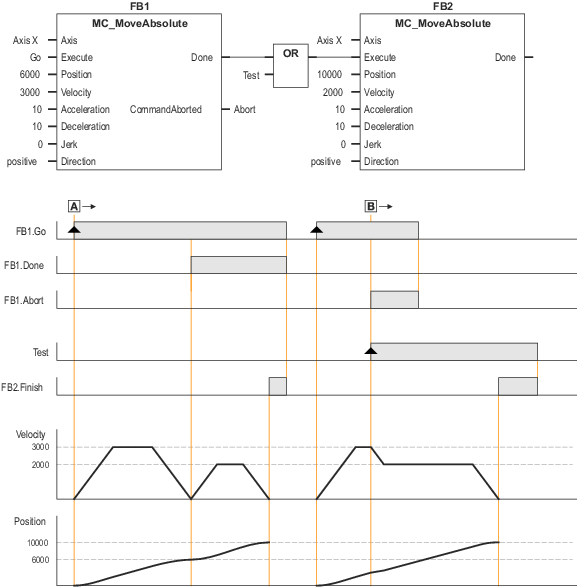
Example: Linking two MC_MoveAbsolute commands