Operation with UPS
This function enables the operation of a 3x400-V inverter with an uninterruptible 1x230-V power supply (UPD) to be able to operate the motor with reduced load for a certain period in the event of a power failure.
NOTICE
UPS operation is not suitable for a continuous operation.
Possible consequences: Device overload
▶
Prevent a too frequent use of this function.

In case of UL, CSA or other North American applications with this function, the standards of the end application must be taken into account.
Restrictions
–
UPS operation is only available for 3x400/480 V devices up to 11 kW.
–
For UPS operation, one reduced output current and one reduced overload are available only:
–
Output current: 60 % of the 400/480 V rated current
–
Overload: 80 %/5 min, 120 %/3 s of the 400/480 V rated current
–
In order to change over to UPS operation, a minimum delay of 10 s is required.
Details
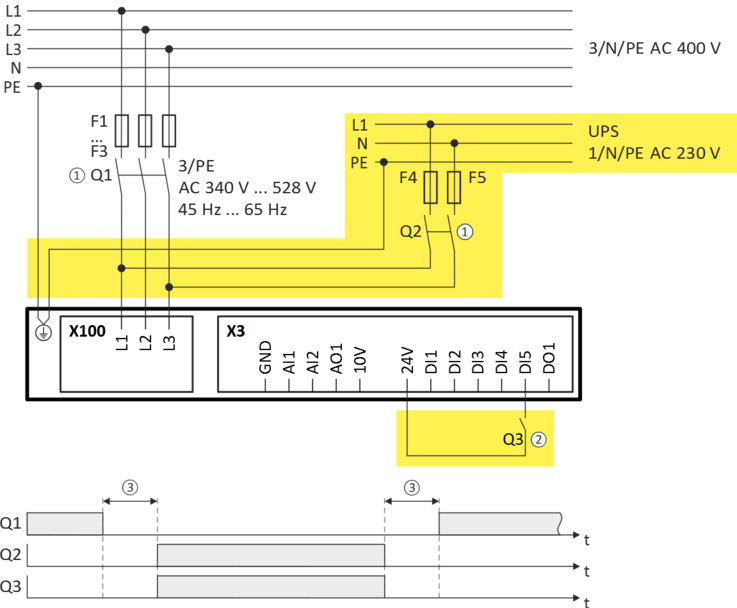
The following figure shows the principal connection of the UPS to the inverter. For further technical details, please contact the inverter manufacturer.
|
|
|
|
①
|
A mutual locking is required for the contactors Q1 and Q2.
|
|
②
|
In this example, the digital input DI5 is used to activate the UPS operation. For this purpose, the function "Activate UPS operation" 0x2631:055 (P400.55) must be assigned to trigger "Digital input 5 [15]".
|
|
③
|
In order to change over to UPS operation, a minimum delay of 10 s is required.
|
The UPS operation can be alternatively activated via network. In this case, a bit of the mappable data word NetWordIN1 0x4008:001 (P590.01) must be assigned to the "Activate UPS operation [55]" function.
If the UPS operation is active,
–
the device overload monitoring (i*t) is adapted accordingly.
–
the DC limit values are reduced.
–
the phase failure detection is switched off.
–
–
trigger "UPS operation active [118]" is set to TRUE. The trigger can be assigned to a digital output.
–
bit 15 ("UPS operation active") in the inverter status word 2 0x2833 is set to "1".
Notes:
–
An additional limitation of speed, current, etc. can be realised via the application with the "Parameter change-over“ function.
Parameter
Example for operating mode
|
Parameter
|
Designation
|
Setting for this example
|
|
Enable inverter
|
Constant TRUE [1]
|
|
|
Run
|
Digital input 1 [11]
|
|
|
Activate UPS operation
|
Digital input 5 [15]
|
|
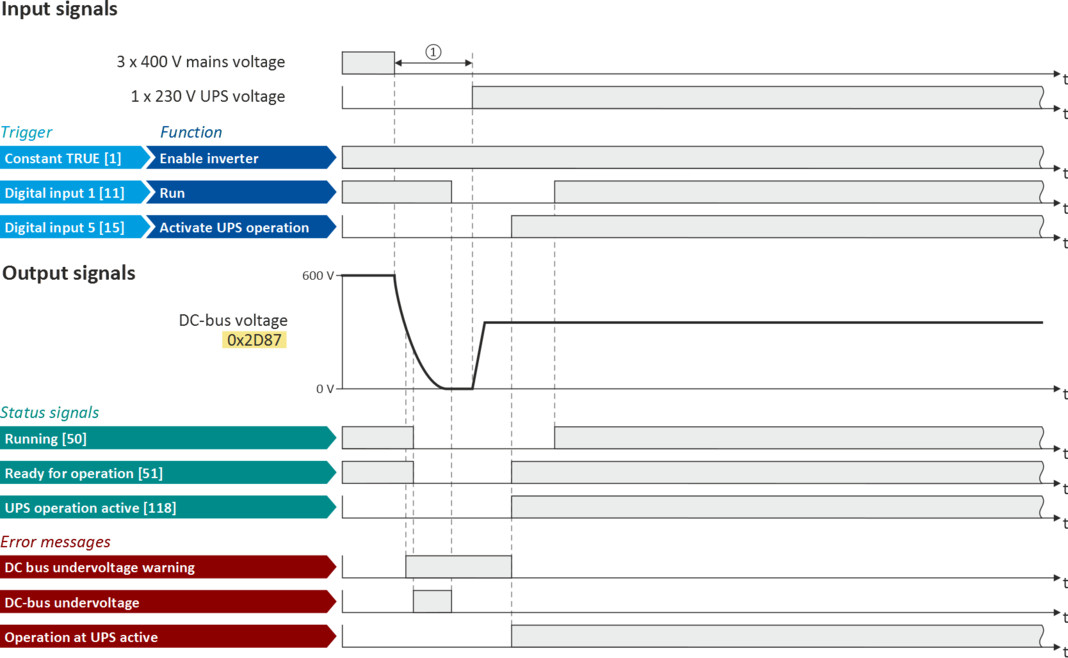
The status signals can be assigned to digital outputs.
 Configure digital outputs Configure digital outputs |
|
|
|
|
|
①
|
In order to change over to UPS operation, a minimum delay is required.
|