v4x0.Authorization
Authorization management has changed between versions v2.1 and v4.1.
Authorization in version v2.1
Since there are only two users on this component, the admin and the user, there is no need to configure the rights. These are fixed.
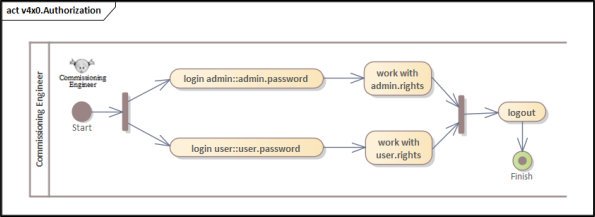
Activity Diagram
The services are permanently assigned to the necessary authorizations. Some examples are listed below.
Admin or user rights required:
-
Set Homepage in the Web Browser
-
Change User Password
-
Display Settings
Admin rights required:
-
Change Admin Password
-
Create new x.509 Certificate
-
Change App Management
Authorization from v4.1 onwards
In v4x0 version >= 4.1, there is only the default admin user. All other users can be added during runtime.
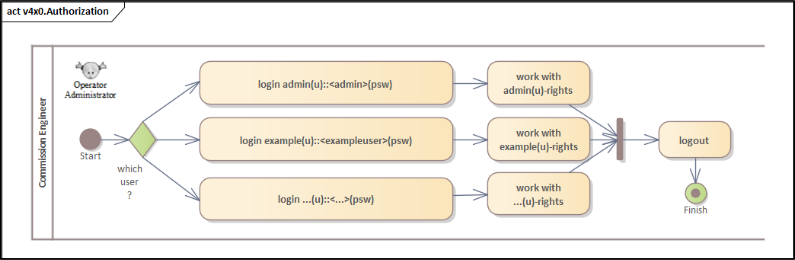
Activity Diagram
In System Settings > Authentication > Roles the admin user is able to set the Rights of each existing role (with the exception of the admin role, which has all rights).
Choose one of the Roles and click the ">" button.
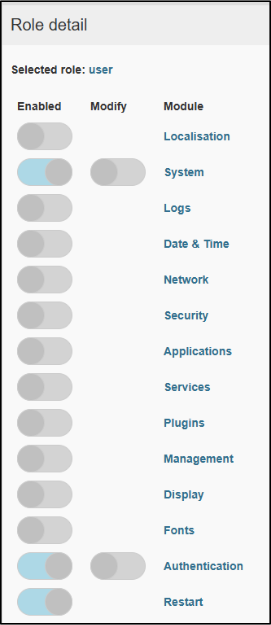
Role detail
For the selected user, the setting for Enable and for some modules also the selection Modify can be made for the respective modules.