v4x0.BackupAndRestore
For Backup and Restore use the System Settings > Management > Config OS [EDIT] function.
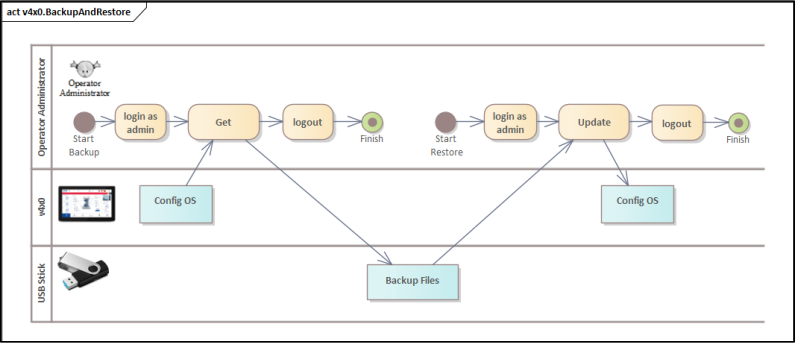
Activity Diagram
Backup
Use a USB Stick (v430: on the USB port, v450: on the Y-cable) and activate the USB connector.
Then activate the Get function in System Settings > Management > Config OS [EDIT].
A .tar.gz file is written to the USB stick.
The backup file is a .tar.gz file and contains unencrypted information about the backup. It must therefore be organizationally protected against unauthorized access.
An integrity file is also required for the restore process. To generate this, it is recommended to generate it during the backup process.
There are many ways to create an MD5 file. As an example, the following function can be used by Windows:CertUtil -hashfile data.tar.gz MD5 > data.tar.gz.md5
Restore
Use a USB Stick (v430: on the USB port, v450: on the Y-cable) and activate the USB connector with an valid backup file and the md5 integrity file.
Then activate the Update function in System Settings > Management > Config OS [EDIT].
A .tar.gz file is loaded from the USB stick and will restore the system of the v4x0 Web Panel.