v4x0.Services
This chapter only deals with the services that are relevant to security. They are located in System Settings > Services.
Autorun scripts from external storage
This setting is relevant for an autostart of an autoexec.sh script file on a USB stick. From a security point of view, it is strongly recommended to leave this setting deactivated.
Avahi Daemon
Avahi is a system which enables programs to publish and discover services and hosts running on a local network. So the user can access the device via host name and not via IP address.
-
Avahi Daemon runs on port udp/5353. From a security point of view, it is recommended that the Avahi daemon is only activated if it is actually used.
DHCP Server
DHCP Server can be activated and used with following parameters:
| Object | Description |
|---|---|
|
Start IP |
IP addresses distributed from the DHCP Server. |
| Gateway | Gateway address. |
| Netmask | Netmask. |
| DNS Server | DNS Server address. |
| Lease Time (seconds) |
Lease Time |
Enable device restore via TAP TAP options
When enabled, it gives the possibility to reset the v4x0 Web Panel in case the admin password is forgotten.
-
This option is enabled by default. The user is recommended to carry out a risk assessment to evaluate whether this option should be deactivated from a security point of view.
Enable device restore via USB
When enabled, it gives the possibility to reset the v4x0 Web Panel in case the admin password is forgotten.
-
This option is enabled by default. The user is recommended to carry out a risk assessment to evaluate whether this option should be deactivated from a security point of view.
Firewall Service
There is a firewall in the v4x0 Web Panel, which can be found under System Settings > Services > Firewall Service [EDIT].
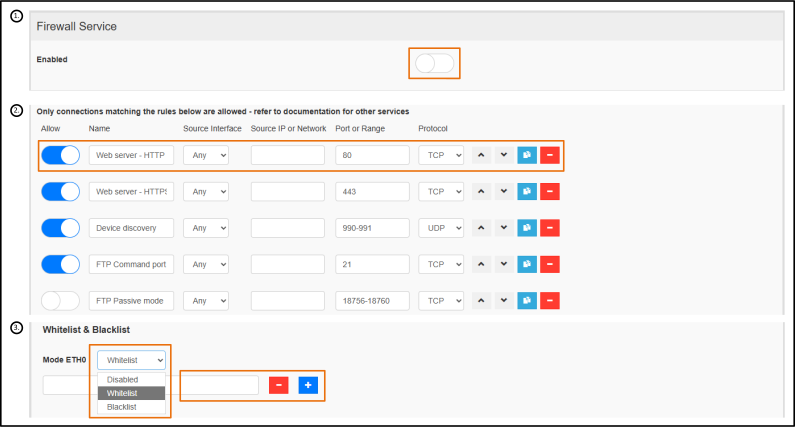
Firewall Settings
First, the user has to enable the Firewall service.
After activation, a general Allow decision can be made for each stored protocol. The typical protocols are already included in the table and can be extended individually for each customer using the "+" button.
| Object | Description |
|---|---|
| Allow | Enable / Disable Firewall Rule. |
| Name | Name of Firewall Rule. |
| Source Interface |
Network Interfaces: |
| Source IP or Network | If this field remains empty, the source IP is not checked and all accesses are permitted. Access can be restricted by entering a specific IP address (e.g. 192.168.100.100) or a range of IP addresses in CIDR format (e.g. 192.168.100.0/24). |
| Port or Range | Single port (e.g. 443) or port range (440-450). |
|
Protocol |
BOTH | TCP | UDP |
| ˄ ˅ | change order of firewall rule lines |
| copy (blue icon) | copy firewall rule line |
| delete (red icon) | remove firewall rule line |
In the last section, the network traffic to a DNS server can be limited. A distinction can be made between whitelist (only allow certain DNS) and blacklist (prohibit certain DNS).
Network Rate Limiter
There is a Network Rate Limiter in the v4x0 Web Panel, which can be found under System Settings > Services > Network Rate Limiter [EDIT].
| Object | Description |
|---|---|
| Active | Enable / Disable Limiter Rule. |
| Name | Name of Limiter Rule. |
| Source Interface |
Network Interfaces: |
| Type |
Network Package Type: |
| Rate | Rate over time period |
| Measure | Time period Pcks/sec : Packages per second Pcks/min : Packages per minute Mbps : Megabytes per second |
| Port or Range | Assign Filter to a single port (e.g. 20) or port range (e.g. 20-30). |
| Protocol |
IPv4 : Internet Layer Protocol, including TCP, UDP, ICMP |
| ˄ ˅ | change order of limiter rule lines |
| copy (blue icon) | copy limiter rule line |
| delete (red icon) | remove limiter rule line |
SNMP Server
The SNMP Server can use the Simple Network Management Protocol (SNMP) to deliver measured values to a central management system on request. Configuration can be made via System Settings > Services > SNMP Server [EDIT].
If the SNMP service is enabled, an external SNMP manager can obtain and process information from the v4x0 Web Panel. The SNMP server runs on UDP port 161.
-
As long as the SNMP Server is not required, it is strongly recommended to deactivate it for security reasons.
SSH Server
The SSH server enables external access to the v4x0 Web Panel. This can be done via an external SSH client. The SSH server runs on port tcp/22 and can only be used by the admin user. Configuration can be made via System Settings > Services > SSH Server [EDIT].
-
As long as the SSH Server is not required, it is strongly recommended to deactivate it for security reasons. The Autostart setting in particular is not recommended, as access is otherwise always possible.
VNC Service
The VNC Service enables external access to the v4x0 Web Panel via VNC. This allowed remote access to the display of the v4x0 Web Panel. The VNC Service runs on port tcp/5900. Configuration can be made via System Settings > Services > VNC Service [EDIT].
-
As long as the VNC Service is not required, it is strongly recommended to deactivate it for security reasons.
Web Server
The Web Server configuration can be found in System Settings > Services > Web Server [EDIT].
| Object | Description |
|---|---|
| Allow only Secure HTTPS connections | Disabled by default to maintain backward compatibility, but it is recommended to enable this option. |
| CORS domains enabled | When disabled (default), access to external domains is not allowed. If this setting is activated, the following filter is applied. |
| CORS domains filter |
One or more domains can be specified. Example of a domain:
Example for multiple domains: |