v4x0.NTP
To configure time synchronization via NTP poll process (Network Time Protocol), the user admin must first authenticate on the v4x0 Web Panel.
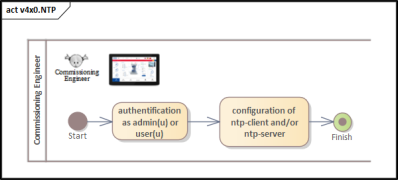
Activity Diagram
All configurations can be found in the System Settings > Date & Time [EDIT] menu.
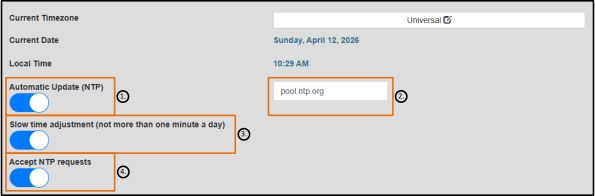
Configuration
Configuration of the NTP client:
-
( 1 ) Activate the
Automatic Update (NTP)slider. -
( 2 ) Add the address of the pool or the IP address of the time server.
-
( 3 ) Activate of Deactivate the signification correction.
Deactive: The NTP can apply a signification correction.
Active: Slow time adjustment is set to 500 ppm. 500 ppm is 0.5 ms per Second (Example: 1 hour timeshift will need about 43 days).
"This feature is available in v4.1 and not in older versions like v2.1"
The configuration is saved by clicking the save button.
-
The datetime will be synchronized via the NTP client from the NTP server* cyclic each ~ 30 seconds during operation.
Configuration of the NTP server:
-
Activate the
Accept NTP requests.
The configuration is taken over with the save button. After activation the NTP Server will be reachable on port udp/123.