Station address setting
Each network node must be provided with a unique station address.
Details
–
The station address of the inverter can be optionally set via the DIP switches on the device labelled with "1" ... "64" or in 0x2341:001 (P510.01). (The DIP switches have priority.)
–
The setting that is active when the inverter is switched on is the effective setting.
–
The labelling of the DIP switches corresponds to the values of the individual DIP switches for determining the station address (see the following example).
–
The active station address is shown in 0x2342:001 (P511.01).
View of the DIP switch
|
|
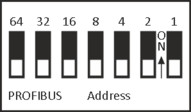
Example of how the station address is set via the DIP switches
|
DIP switch
|
64
|
32
|
16
|
8
|
4
|
2
|
1
|
|
Setting
|
OFF
|
OFF
|
ON
|
OFF
|
ON
|
ON
|
ON
|
|
Value
|
0
|
0
|
16
|
0
|
4
|
2
|
1
|
|
Station address
|
= sum of all values = 16 + 4 + 2 + 1 = 23
|
||||||
Parameter