Mark window and mark register
Set Activate tool mark window parameter = TRUE to activate the functionality of the mark window.  0x5041:129
 Set Activate tool mark window parameter = FALSE to edit each mark. 0x5041:129
0x5041:129 Set Mark window teaching parameter = 1 to set the mark window with the teach-in function. 0x5041:015
0x5041:015In the Control signals parameter, set bit 22 to activate the mark window in the Tool mark window size parameter learned via the teach-in function for the following marks.
The following table provides information on the status of the mark window:
|
Parameter name
|
Parameter index
|
Bit status
|
Status
|
|
Activate tool mark window
|
TRUE
|
Mark window active
|
|
|
FALSE
|
Mark window deactivated
|
||
|
Mark window teaching
|
1
|
Mark window of the tool correction is learned
|
|
|
0
|
Mark window of the master value correction is learned
|
The figure shows the use of a mark stack. The distance from the mark sensor to the tool is greater than the set mark distance.
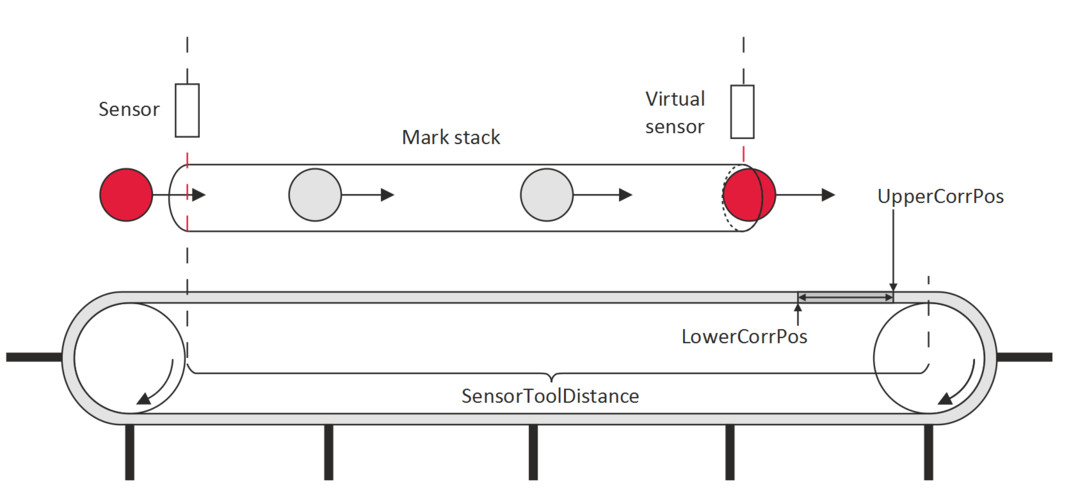
Fig. 1: Systematic representation of the mark stack with a pocket-type conveyor
Mount the mark sensor as close as possible to the axis. The further from the axis the mark sensor is mounted, the more imprecise the cuts will be.
Up to 64 mark signals are managed in the mark stack. These marks are available to the system at the right time to delay the mark register length. This allows the tool to be corrected to the correct mark signal.
The distance between the touch probe sensor and the position where the tool starts is assigned via the Tool sensor distance parameter. 0x5041:121
0x5041:121The "mark stack" function is automatically activated when the Tool sensor distance parameter is greater than der Cycle length parameter.
After a mark has been detected, the value of the mark deviation is released for correction only if the position in the register cycle has covered the distance of the mark register.
Parameter