Position correction

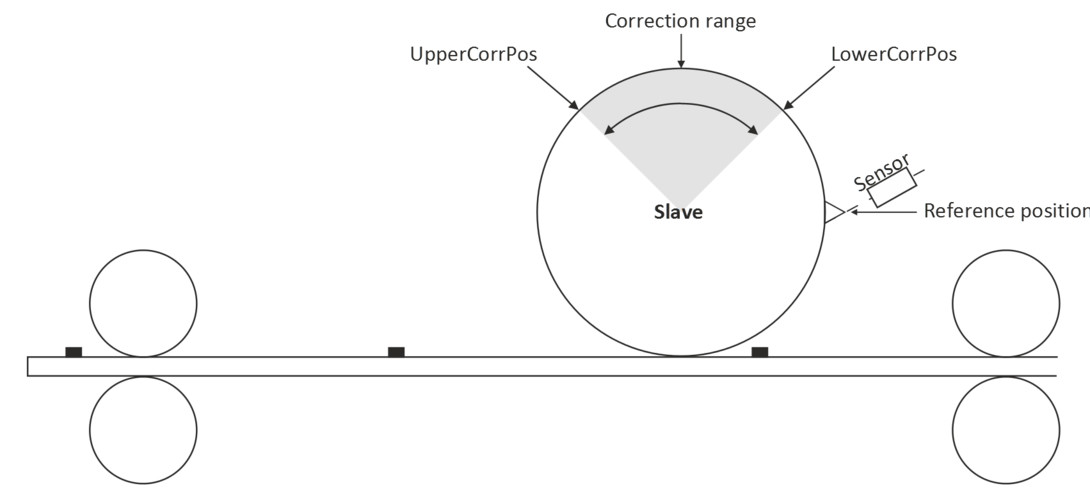
The correction window specifies the position range. The tool position is corrected within the position range. The position of the correction window is specified via the parameters Tool lower correction position and Tool upper correction position.
–
Tool lower correction position 0x5041:125
 
–
Tool upper correction position 0x5041:124
 
The parameters are set in the unit of the tool axis.
 
The Tool sensor distance parameter specifies the distance between the touch probe sensor and the zero position of the tool on the material. 0x5041:121
Fig. 1: Homing on the fly without mark stack
 
Parameter
Address
Name / setting range / [default setting]
Information
0x5041:121
Tool sensor distance
0.0000 ... [360.0000] ... 214748.3647
0x5041:122
Max. positive tool correction
0.0000 ... [45.0000] ... 214748.3647
0x5041:123
Max. negative tool correction
0.0000 ... [45.0000] ... 214748.3647
0x5041:124
Tool upper correction position
0.0000 ... [350.0000] ... 214748.3647
0x5041:125
Tool lower correction position
0.0000 ... [180.0000] ... 214748.3647
0x5041:130
Start tool correction
false
Disabled
true
Enabled
0x5042:141
Actual position tool correction mark
–
Read only
 
0x5042:142
Actual tool error
–
Read only
 
0x5042:143
Actual tool error limited
–
Read only