Clutching the cross cutter to moving material
For the clutch-in process to moving material, the cross cutter must be in the parking position ( xExecuteMoveToParkPos input = TRUE).
Positioning to the parking position
The "Clutching to moving material" clutching type is selected by setting the scPar.eSyncMode parameter to 0 (Cam_in).
Axis must be in park position before synchronization:
Before starting the synchronization process, the axis must be in the defined park position.
Function for moving to park position:
The function xxMoveToParkPos can be used to move the axis to the park position.
The cross cutter is synchronised to the material position (X position and resulting Y position from the cam) using the input SyncIn = TRUE.
There are two possibilities to specify the current material position:
-
scPar.xMasterAbsolute parameter = FALSE. The material position is defined via the scPar.lrStartXPosRelative parameter.
-
scPar.xMasterAbsolute parameter = TRUE. This parameter sets the current material position to the position of the master axis and thus defines an absolute reference between these two positions for positioning the slave axis. The slave axis is clutched-in via the calculated start cam in the synchronous phase from the parking position.
In the "Length cutting" operating mode ( scPar.eCuttingMode parameter = 0) the clutch-in distance of the master axis can be set via the scPar.lrMasterSyncInDist parameter. Then the first cutting length is defined. Setting scPar.lrMasterSyncInDist to 0 serves to calculate the optimum clutch-in distance.
The clutch-in process is carried out in the "SYNCHRONISING_POS" status and the xAccDecSync output is set to TRUE. After successful clutch-in, the output xSynchronised = TRUE and the "CUTTING" status is set.
Inputs relevant for the function
-
xExecuteMoveToParkPos
-
xSyncIn
Outputs relevant for the function
-
xAccDecSync
-
xSynchronised
Parameters relevant for the function
-
scPar. xMasterAbsolute, initial value: True
-
scPar. lrStartXPosRelative , initial value: 0 unit
-
scPar.eSyncMode , initial value: 0
-
scPar.lrMasterSyncInDist, initial value: 0 unit
-
scPar.eCuttingMode, initial value: 0
Example
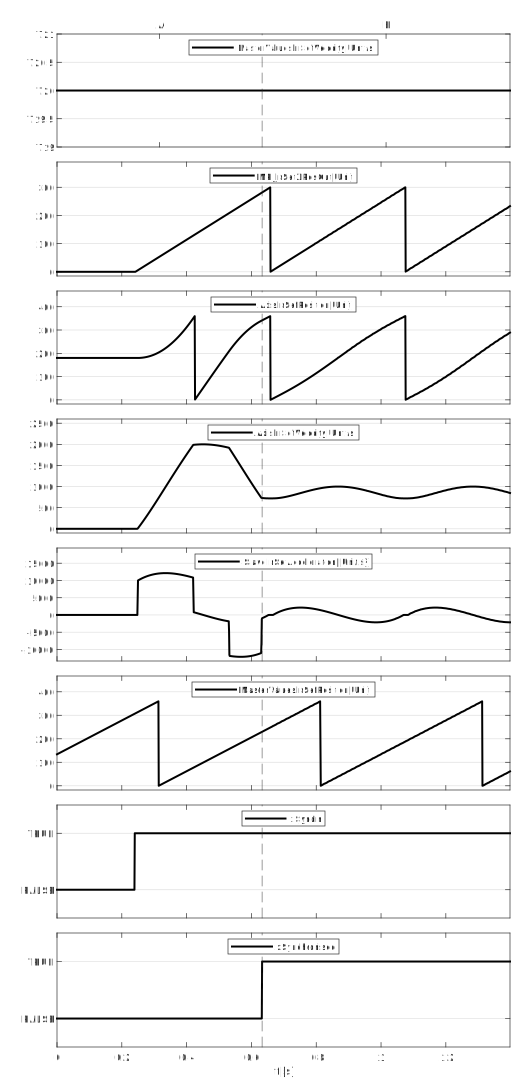
|
No |
xSyncIn |
xSynchronised |
INFO |
|---|---|---|---|
|
1 |
FALSE ä TRUE |
FALSE |
The cross cutter is synchronised to the master axis via the cam. |
|
2 |
TRUE |
TRUE |
The cross cutter is already synchronous with the master axis via the cam up to its entry into the synchronous area. |