Mark window master value correction
In the case of print images, it can happen, for example, that not only the print marks themselves but also parts of the print image or other interfering signals are located in the scanning field of the mark sensor.
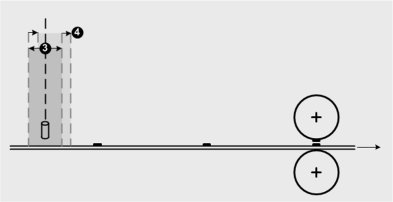
Continuous driving operation
|
❸ |
Parameter scPar. lrMarkWindowSizeMaster |
|
❹ |
Parameter scPar. lrSetOffsetMarkWindowMaster |
A mark window can be activated to prevent the mark sensor from being triggered unintentionally. When the scPar.xEnableMarkWindowMaster parameter = TRUE, the mark window function is active.
For the master value correction to function properly when the mark window is activated, the mark window has to be taught once. That can happen in the declutched state (master value is moving, drive axis is at standstill) as well as when the drive axis is in the clutched-in state (master value and drive axis are moving).
If the mark window is taught, the scPar.lrMarkWindowSizeMaster mark window is placed symmetrically around the detected mark.
If this happens when the drive axis is in the declutched state, the master position is set to the optimum position when the mark is detected.
If the mark window is taught when the drive axis is in the clutched-in state, only the mark window is activated when the first mark occurs. The master position is not set and is corrected within the correction window via the master value correction.
If the mark window has to be shifted this can be done with the help of the scPar.lrSetOffsetMarkWindowMaster parameter.
Inputs relevant for the function
-
xTeachMarkWindow
Outputs relevant for the function
-
xMarkWindowTeached
Parameters relevant for the function
-
scPar.xEnableMarkWindowMaster
-
scPar.lrMarkWindowSizeMaster , initial value: 90 unit
-
scPar.lrSetOffsetMarkWindowMaster , initial value: 0 unit
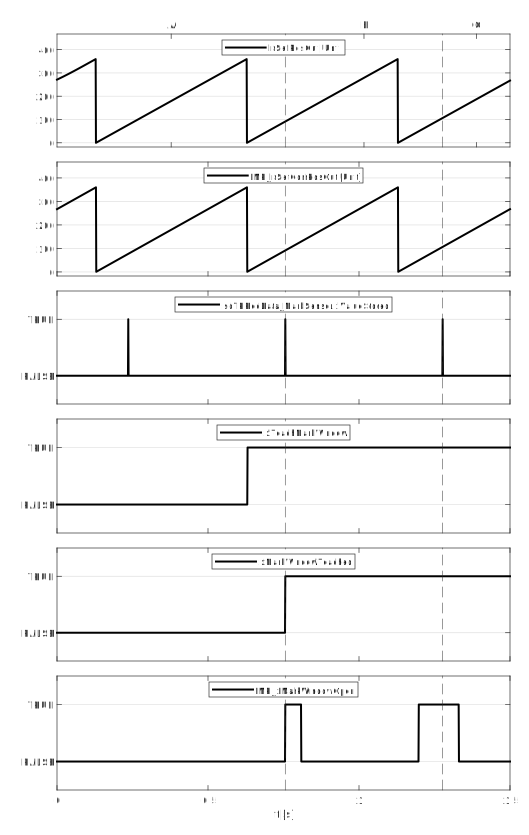
Example: 1
|
No |
scTPRecData_
|
xTeachMarkWindow |
xMarkWindowTeached |
scSignal-Flow.MP_ xMarkWindowOpen |
INFO |
|---|---|---|---|---|---|
|
1 |
FALSE |
FALSE ä TRUE |
FALSE |
FALSE |
Mark window teaching is started |
|
2 |
FALSE ä TRUE |
TRUE |
FALSE ä TRUE |
FALSE ä TRUE |
The first mark after the teach process has started opens the mark window. |
|
3 |
FALSE ä TRUE |
TRUE |
TRUE |
TRUE |
The mark window is open. The next mark is detected within the mark window. |
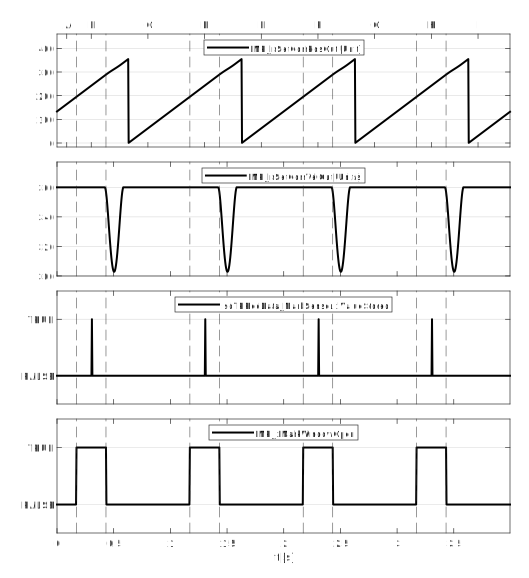
Example 2
|
No |
scTPRecData_MarkSensor.xValueStored |
scSignal-Flow.MP_ xMarkWindowOpen |
INFO |
|---|---|---|---|
|
1 |
FALSE ä TRUE æ FALSE |
FALSE ä TRUE |
The first mark occurs within the mark window. |
|
2 |
FALSE ä TRUE æ FALSE |
FALSE ä TRUE |
The second mark occurs within the mark window. |
|
3 |
FALSE ä TRUE æ FALSE |
FALSE ä TRUE |
The third mark occurs within the mark window. |
|
4 |
FALSE ä TRUE æ FALSE |
FALSE ä TRUE |
The fourth mark occurs within the mark window. |