"Cutting on a mark (event-controlled)" operating mode
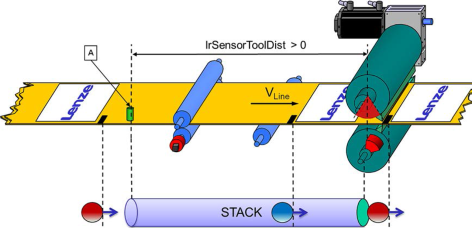
"Cutting on a mark (event-controlled)" operating mode
|
A |
Cutting mark sensor (touch probe sensor) |
The "Cutting on a mark (event-controlled)" operating mode is selected by setting the scPar.eCuttingMode parameter to 3. It is only possible to use this operating mode if the cutting mark sensor is installed in front of the cross cutter. The distance between cross cutter and the cutting mark sensor is set by setting the scPar.lrSensorToolDistance to > 0.
The profiles are calculated in real time in this operating mode, allowing the synchronous phase to be changed during the cutting process. All changes are accepted after the synchronous phase and are effective for the next cut. The synchronous speed of the sealing roller is calculated depending on the circumference of the roller in the scPar.lrToolCircumference parameter, the speed of the master axis and the cycle length of the sealing roller.
If the SyncIn input is set to TRUE, the starting curve is calculated from the current position in the synchronous phase. The cutting process starts as soon as a valid mark (detected touch probe with the current position) is present. The cross cutter makes the cut at the detected marks. If no other valid marks are detected, the cross cutter is moved to the parking position. The cross cutter remains at standstill until another valid mark is detected. A valid mark serves to re-initiate the cutting process.
All valid marks are stored in a register. The register can keep a maximum of 100 marks. After each cut, the next mark from the register is processed for the next step.
Several marks can be stored and processed consecutively during the cutting process. In order to hide marks, a minimum distance between two marks must be set using the scPar.lrMinProductLength parameter. After a valid mark, the following marks within the minimum distance are hidden by the technology module.
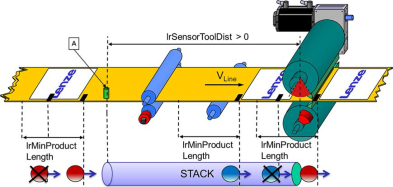
Cutting on a mark with the minimum product length (parameter lrMinProductLength)
|
A |
Cutting mark sensor (touch probe sensor) |
Parameters relevant for the function
-
scPar.xMasterAbsolute, initial value: TRUE
-
scPar.lrStartXPosRelative , initial value: 0 unit
-
scPar.eCuttingMode , initial value: 0
-
scPar.lrSensorToolDist , initial value: 0 unit
-
scPar.lrMinProductLength , initial value: 50 unit
-
scPar.lrToolCircumference , initial value: 75 55555 unit
-
scPar.lrCuttingAngle , initial value: 10 unit
-
scPar.byNumOfTools , initial value: 1 unit
-
scPar.byStartToolNo , initial value: 0 unit
Example
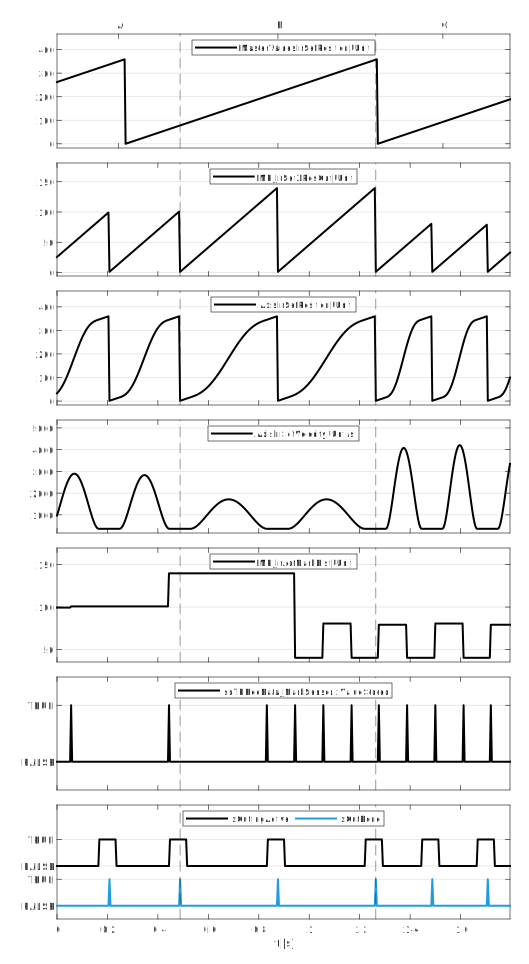
|
No |
scTPRecData_MarkSensor.xValueStored |
INFO |
|---|---|---|
|
1 |
Rising edge at the start of area 1 |
The TM is executed in the scPar.eCuttingMode = CutOnTP mode. Distance between the TP sensor and the cutting position: scPar.lrSensorToolDist = 160 The marks on the material are sporadic and have no fixed distance. |
|
2 |
Rising edge at the start of area 2 |
The TM cuts in area 2; Cutting length = Mark distance to the mark in area 1 |
|
3 |
Rising edge at the start of area 3 |
The TM cuts in area 3; Cutting length = Mark distance to the mark in area 2 |
|
4 |
Rising edge at the start of area 4 |
The TM cuts in area 4; Cutting length = Mark distance to the mark in area 3 |