Touch probe connection
This chapter describes the connection of a touch probe to a V2 technology module by way of example.
In order to be able to use the touch probe functionality, one instance of the MC_Touchprobe function block must be used in the application. The user can choose which touch probe source is to be used for the mark sensor via the parameters of this function block.
The touch probe is connected to the technology module via the scTpRecData_MarkSensor input structure.
This input is connected to the RecData output of the "MC Touchprobe" module, as can be seen in the following figure.
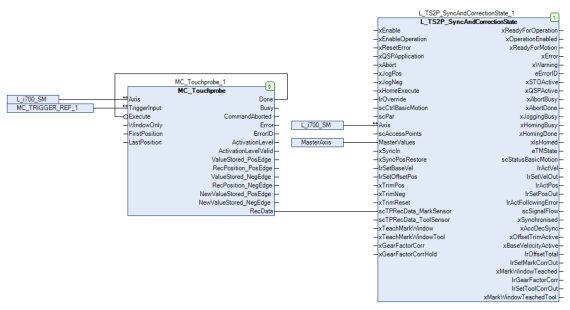
Interconnection example for touch probe connection
Example
A digital slave axis input was used for this example. The triggering mode of the MC_Touchprobe block is set to single measurement. As soon as a touch probe signal has been detected, a new touch probe measurement is requested via the inverted MC_Touchprobe_1.Done signal.
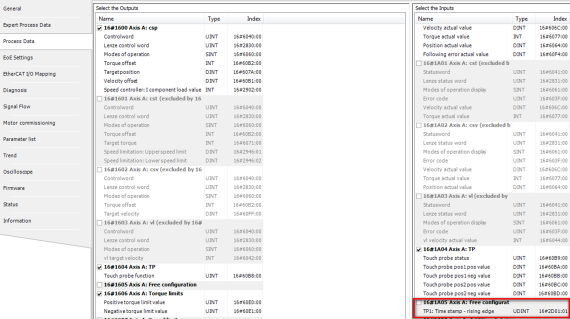
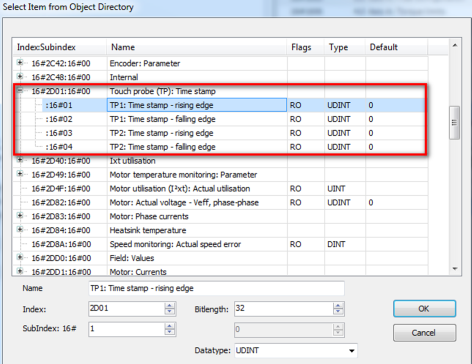
The touch probe evaluation of this technology module functions via a time stamp. If the technology module is used on a controller, the EtherCAT time stamp of the digital input used must be added to the EtherCAT mapping by the user. This step is not necessary for the i950 PLC device. Here, all necessary data are already transferred to the application.
-
Activating expert settings.

-
Selecting the mapping to be extended.
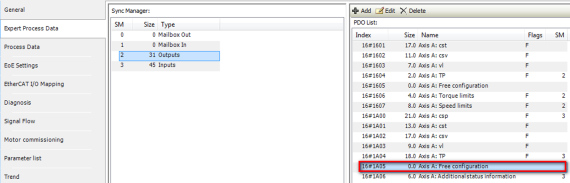
-
Add time stamp objects to the free mapping.
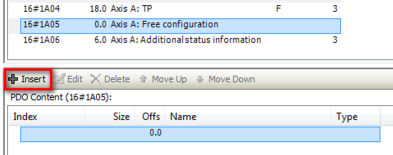
-
Add free mapping objects to the EtherCAT mapping.