MC_MoveContinuousAbsolute
This FB serves to execute a positioning to an absolute target position. In contrast to the MC_MoveAbsolute command, the target position is approached with the defined final speed. If no further motion command is available in the buffer, the axis continues to traverse with the defined final speed.

|
Note!
For absolute positioning processes, the home position must be known! |
|
|
|
|
MC_MoveContinuousAbsolute |
|
|
|
|
|---|---|---|---|---|---|---|---|
|
AXIS_REF |
- |
|
Axis |
InEndVelocity |
|
- |
BOOL |
|
BOOL |
- |
|
Execute |
Busy |
|
- |
BOOL |
|
BOOL |
- |
|
ContinuousUpdate |
Active |
|
- |
BOOL |
|
LREAL |
- |
|
Position |
CommandAborted |
|
- |
BOOL |
|
LREAL |
- |
|
EndVelocity |
Error |
|
- |
BOOL |
|
LREAL |
- |
|
Velocity |
ErrorID |
|
- |
L_IE1P_Error |
|
LREAL |
- |
|
Acceleration |
|
|
|
|
|
LREAL |
- |
|
Deceleration |
|
|
|
|
|
LREAL |
- |
|
Jerk |
|
|
|
|
|
MC_DIRECTION |
- |
|
Direction |
|
|
|
|
|
MC_BUFFER_MODE |
- |
|
BufferMode |
|
|
|
|
|
|
|
|
|
|
|
|
|
Inputs
|
Name Data type |
Information/possible settings |
|
|---|---|---|
|
Axis |
Transfer of the axis data structure |
|
|
Execute BOOL |
FALSE ä TRUE |
Start positioning. |
|
ContinuousUpdate BOOL |
Continuous acceptance of the profile parameters |
|
|
FALSE |
The profile parameters ( Position , Velocity , Acceleration , ...) are accepted with a rising edge at Execute . |
|
|
TRUE |
The profile parameters are accepted continuously, i.e. during the execution, the motion profile may change. Note: After the position and final speed ( InEndVelocity = TRUE) have been reached, the profile parameters are not accepted continuously anymore. |
|
|
Position LREAL |
Absolute target position in [unit]
|
|
|
EndVelocity LREAL |
Final velocity in [units/s] for moving to the target position. The final velocity is absolute. This means that the drive moves in a positive direction if the setting is positive and in a negative direction if the setting is negative. |
|
|
Velocity LREAL |
Maximum velocity in [unit/s] for approaching the target position
Special case : Velocity = 0: The default value defined in subindex 40 is used for the velocity. |
|
|
Acceleration LREAL |
Maximum acceleration in [unit/s 2 ] Special case : Acceleration = 0: The default value defined in subindex 41 is used for the acceleration. |
|
|
Deceleration LREAL |
Maximum deceleration in [unit/s 2 ] Special case : Deceleration = 0: The default value defined in subindex 41 is used for the acceleration. |
|
|
Jerk LREAL |
Maximum jerk in [unit/s 3 ] Special case : Jerk = 0: The default value defined in subindex 43 is used for the jerk. |
|
|
Direction |
The selection of the traversing direction is only evaluated in the "Modulo" traversing range. SubIndex 135, ToleranceWindowModuloPositioning Traversing direction:
|
|
|
BufferMode |
Mode for processing successive motion commands |
|
 Motion axes (AXIS_REF)
Outputs
Application example "laser cutting-off machine":
One application case for the MC_MoveContinuousAbsolute is a linear laser cutting-off machine. On a linear axis, a laser for cutting workpieces is mounted.
- During the cutting process, the laster has to be traversed with a constant velocity, i.e., in this phase, an acceleration or deceleration must not take place.
- After cutting, the laser has to be traversed into its idle position again.


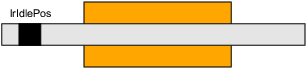

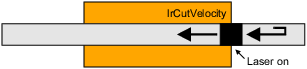

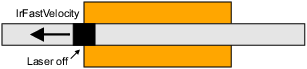
The work flow described before can be realised as follows:
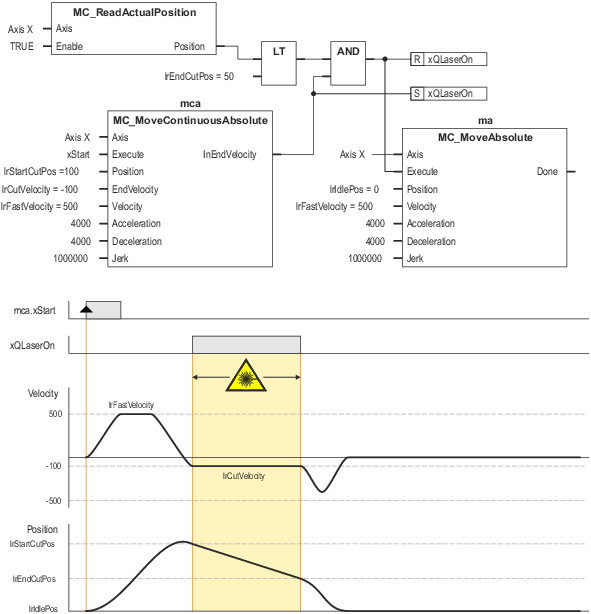
Principal wiring and time diagram for the "laser cutting machine" application sample
A FALSE-TRUE edge at xStart starts a cutting cycle. The "mca" instance of the MC_MoveContinuousAbsolute traverses the axis with high velocity lrFastVelocity to the lrStartCutPos position. As the commanded final velocity is negative, the lrStartCutPos position is first overtravelled and a reversal of rotation takes place. When lrStartCutPos is reached again, the axis then has the commanded final velocity. The InEndVelocity output is set to TRUE and this signal switches on the laser. As long as no other motion FB aborts the motion command MC_MoveContinuousAbsolute , the axis continues to traverse at constant velocity in negative direction. When the lrEndCutPos position is reached, the laser is switched off and the "ma" instance of the MC_MoveAbsolute transmits the fast traversing of the laser to its idle position.