Activate quick stop
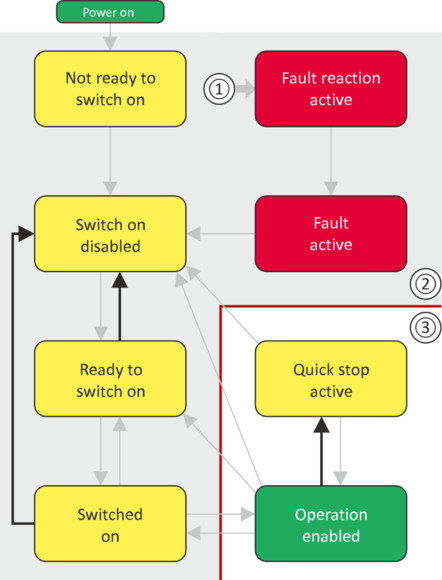
This command activates quick stop when the operation is enabled.
–
The drive is brought to a standstill irrespective of the setpoint specified with the deceleration (0x6085 (P790.00)) set for quick stop.
–
A changeover to the "Quick stop active" device status takes place.
–
Then, state change to "Switch-on inhibited" parameter 0x605A "CiA: Quick stop mode".
If the operation is not enabled (device state "Ready to switch on" or "Switched on"), this command changes the state to "operation disabled".
|
|
|
|
1
|
From all states
|
|
2
|
Power section disabled (pulse inhibit)
|
|
3
|
Power section enabled
|
|
Bit pattern in the CiA control word (0x6040)
|
||||||||
|
Bit 15 ... 8
|
Bit 7
|
Bit 6
|
Bit 5
|
Bit 4
|
Bit 3
|
Bit 2
|
Bit 1
|
Bit 0
|
|
Reserved
(specific)
|
Reset fault
|
Operating mode dependent
|
Operation enabled
|
Activate quick stop
|
Establish readiness for operation
|
Switch-on
|
||
|
X = state is not relevant
|
||||||||
|
X
|
0
|
X
|
X
|
X
|
X
|
0
|
1
|
X
|
–
During quick stop, the inverter executes the setpoint generation and no longer follows the setpoint defined by the network master.
–
If several inverters execute a chained synchronous motion, the quick stop function has to be coordinated by the network master by means of a quick stop profile (master function). In this case, quick stop cannot be activated via the control bit 2.
–
During the quick stop, the maximum current (0x6073 (P324.00)) and the maximum torque (0x6072 (P326.00)) are active. The lower of the two limits determines the motor torque output. The torque limits from 0x60E0 and 0x60E1 are not effective during the quick stop.