Tool correction mark window
Tool correction also offers the functionality of a mark window. To activate this, the scPar.xEnableMarkWindowTool parameter must be set to TRUE.
Each touch probe is evaluated when the mark window is deactivated.
The first mark has to be taught so the mark window can work properly. To this end, the xTeachMarkWindowTool input must be set to TRUE.
The scPar.lrMarkWindowSizeTool mark window is placed symmetrically around the detected mark when the next touch probe is detected.
The mark window can be shifted via the scPar.lrSetOffsetMarkWindowTool parameter.
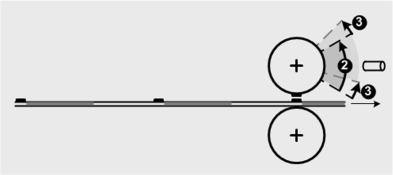
Tool correction window
|
❷ |
Parameter lrMarkWindowSizeTool |
|
❸ |
Parameter lrSetOffsetMarkWindowTool |
Mark failure detection
If the scSF.MP_xMarkNotDetectedTool signal flow variable is set, no mark has been detected within the parameterised mark window. In this case, no position error is calculated so that downstream functions can still be executed.
The scPar.dwMaxNumberVirtualMarksTool parameter is used to parameterise the maximum allowed number of mark failures. If the maximum number of undetected marks is reached, an error message is output.
Inputs relevant for the function
-
xTeachMarkWindowTool
Outputs relevant for the function
-
xMarkWindowTeachedTool
Parameters relevant for the function
-
scPar.xEnableMarkWindowTool , initial value: FALSE
-
scPar.lrMarkWindowSizeTool , initial value: 90 unit
-
scPar.lrSetOffsetMarkWindowTool , initial value: 0 unit
-
scPar.dwMaxNumberVirtualMarksTool , initial value: 5