
|
Tip |
|---|---|
|
The version of the function block as described here corresponds to the latest version of the function block in Version list of function blocks. |
SF_EmergencyStop is a certified PLCopen function block. For detailed information about applied standards, see "PLCopen – Technical Committee 5 – Safety Software".

|
Important |
|---|---|
|
The requirements listed in the standards must be fulfilled by the user. |
This function block is a safety-oriented function block for monitoring an emergency stop button. SF_EmergencyStop can be used for emergency switch-off functionality (stop category 0), or – with additional peripheral support – as emergency stop (stop category 1 or 2).
Table 26. VAR_INPUT
|
Name |
Data Type |
Initial Value |
Description, parameter values |
|---|---|---|---|
|
|
|
|
|
|
|
|
|
Input which requests safety Variable
|
|
|
|
|
|
|
|
|
|
|
|
|
|
|
Table 27. VAR_OUTPUT
|
Name |
Data Type |
Initial Value |
Description, parameter values |
|---|---|---|---|
|
|
|
|
|
|
|
|
|
Output for safety-oriented response
Request for safety-oriented response (for example, emergency stop button is engaged, reset required or internal error exists)
No demand for safety-oriented response (e.g. emergency stop button not engaged; no internal errors active). |
|
|
|
|
|
|
|
|
|
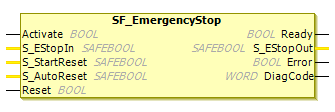
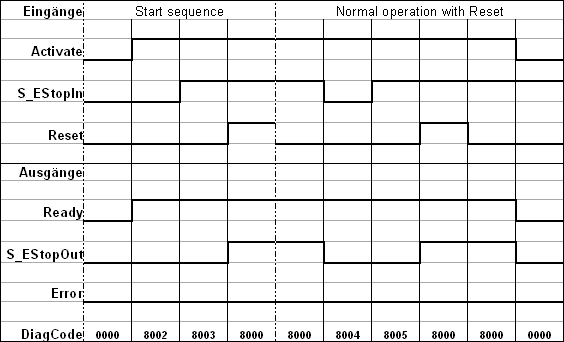
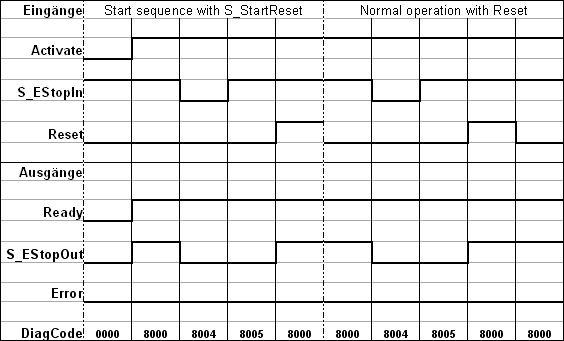
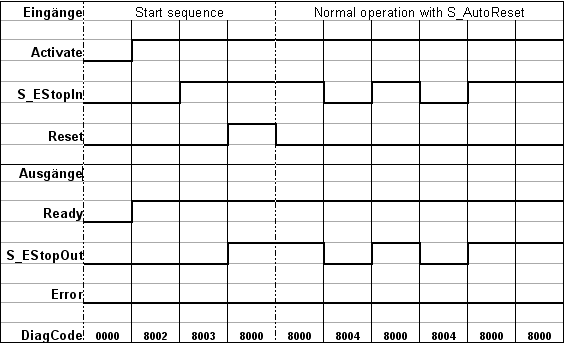
The S_EStopOut enable signal is reset to FALSE as soon as the S_EStopIn input is set to FALSE. The S_EStopOut enable signal is reset to TRUE only if the S_EStopIn input is set to TRUE and a reset occurs. The enable reset depends on the defined S_StartReset, S_AutoReset, and Reset.
If S_AutoReset = TRUE: Acknowledgment is automatic.
If S_AutoReset = FALSE: A rising trigger at the Reset input must be used to acknowledge the enable.
If S_StartReset = TRUE: Acknowledgment is automatic the fist time the S-PLC is started.
If S_StartReset = FALSE: A rising trigger at the Reset input must be used to acknowledge the enable.

|
Caution |
|---|---|
|
The |
SF_EmergencyStop can be used to monitor both single and dual-channel emergency stop buttons. For example, for two-channel applications, the additional SF_Equivalent function block can be used to detect whether the contact synchronization has been exceeded. The category classification in accordance with EN ISO 13849-1 will depend on the final elements that are used.
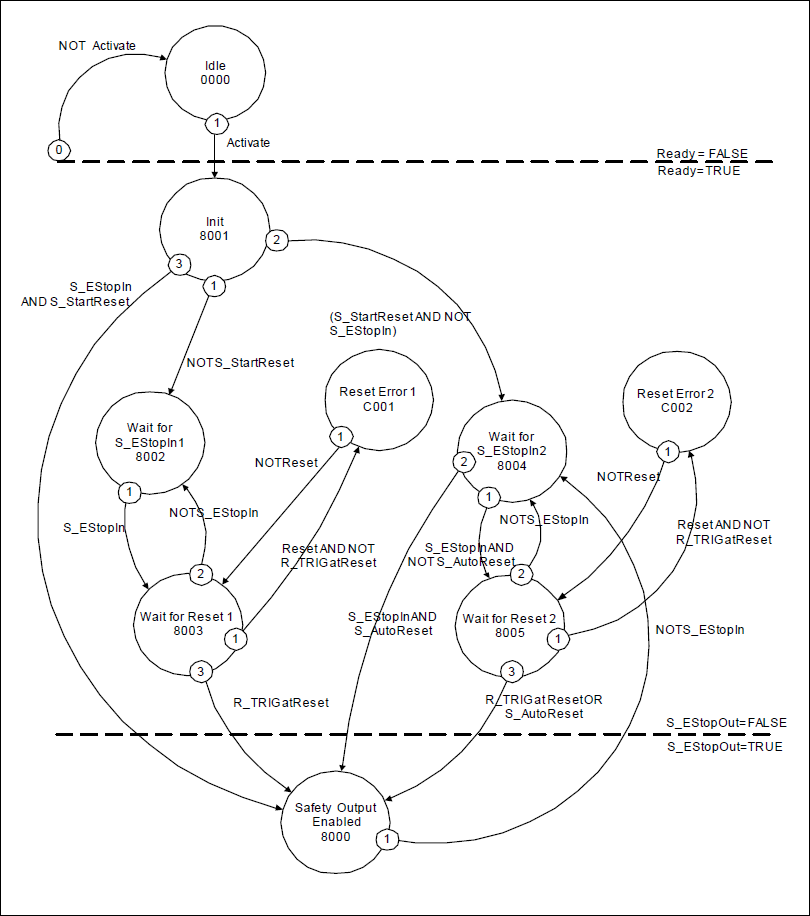
The SF_EmergencyStop automatically detects a static TRUE on Reset. Further error detection, e.g. wire break or short circuiting, depends on the dedicated hardware that is used.
|
|
Tip |
|---|---|
|
Note: The transition from any state to the |
S_EStopOut is set to FALSE. In case of a static TRUE signal at the Reset input, the DiagCode output shows the relevant error code and the Error output is set to TRUE.
To exit the error states, the reset has to be set to FALSE.
Table 28. FB-specific error codes
|
|
Statue Name |
Status description and output setting |
|---|---|---|
|
|
|
While waiting for
|
|
|
|
While waiting for
|
Table 29. FB-specific status codes (no error)
|
|
Statue Name |
Status description and output setting |
|---|---|---|
|
|
|
The function block is not active (basic state).
|
|
|
|
Activation is TRUE. The block has been activated. Check whether
|
|
|
|
Activation is
|
|
|
|
Activation is
|
|
|
|
Activation is
|
|
|
|
Activation is
|
|
|
|
Activation is
|