
|
Tip |
|---|---|
|
The version of the function block as described here corresponds to the latest version of the function block in Version list of function blocks. |
SF_GuardLocking is a certified PLCopen function block. For detailed information about applied standards, see "PLCopen – Technical Committee 5 – Safety Software".

|
Important |
|---|---|
|
The requirements listed in the standards must be fulfilled by the user. |
This FB controls the entrance to a hazardous area by means of an interlocked guard with locking (four-stage interlocking).
|
|
Important |
|---|---|
|
The requirements listed in the standards must be fulfilled by the user. |
Table 44. VAR_INPUT
|
Name |
Data Type |
Initial Value |
Description, parameter values |
|---|---|---|---|
|
|
|
|
|
|
|
|
|
Variable Monitors the interlocked disconnecting guard
|
|
|
|
|
Variable. Status of the hazardous area (EDM), for example, based on velocity monitoring or safe fallback delay time
|
|
|
|
|
Variable Status of the mechanical interlocked guard.
|
|
|
|
|
Variable. Intervention by the operator – request to unlock the guard
|
|
|
|
|
|
|
|
|
|
|
|
|
|
|
General input parameters: Also used for the request that the guard should be locked again. The characteristic of the signal must comply with a manual reset device. |
Table 45. VAR_OUTPUT
|
Name |
Data Type |
Initial Value |
Description, parameter values |
|---|---|---|---|
|
|
|
|
|
|
|
|
|
Interface to the hazardous area which has to be stopped.
|
|
|
|
|
Signal to unlock the guard.
|
|
|
|
|
|
|
|
|
|
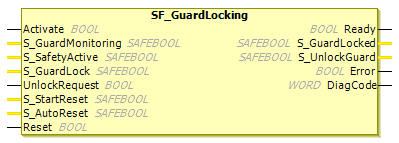
This FB controls a locked guard and monitors the position of the guard and the guard with locking. SF_GuardLocking can be used with a mechanically interlocked switch.
The operator makes a request to gain access to a hazardous area. The guard can only be unlocked if the hazardous area is in a safe state. The guard can be locked when it is closed. The machine can be started when the guard is closed and locked. An open or unlocked guard is detected in the event of a safety-critical situation.

|
Caution |
|---|---|
|
The |
Table 46. Function sequence
|
1. |
|
Requirement to bring the hazardous area to a safe condition – not part of this FB |
|
2. |
|
Feedback from the relevant hazardous area that it is in a safe state (via |
|
3. |
|
Request from the operator to unlock the guard. (via UnlockRequest) |
|
4. |
|
Allow the guard to open. |
|
5. |
|
Guard locking of the guard is unlocked (via Operator opens the guard |
|
6. |
|
Monitoring of the state of the guard via |
|
7. |
|
Operator feedback to reactivate the hazardous area (Reset). |
|
8. |
|
Locking the guard ( |
|
9. |
|
Check whether the guard is locked ( |
|
10. |
|
Hazardous area is ready for operational use ( |
|
11. |
|
Restart operation in the hazardous area. |
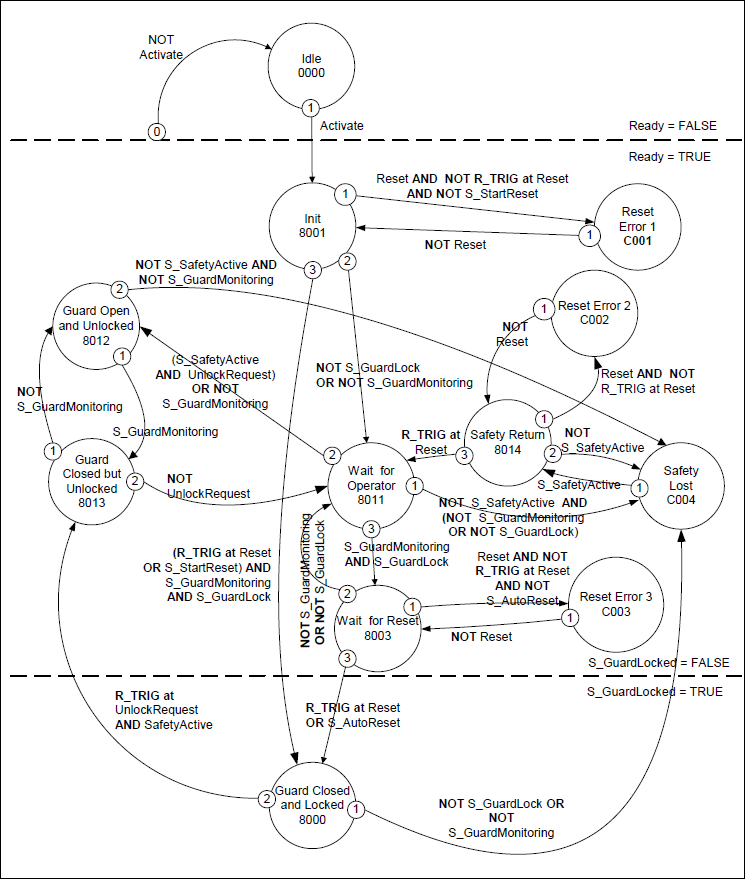
|
|
Tip |
|---|---|
|
Note: The transition from any state to the |
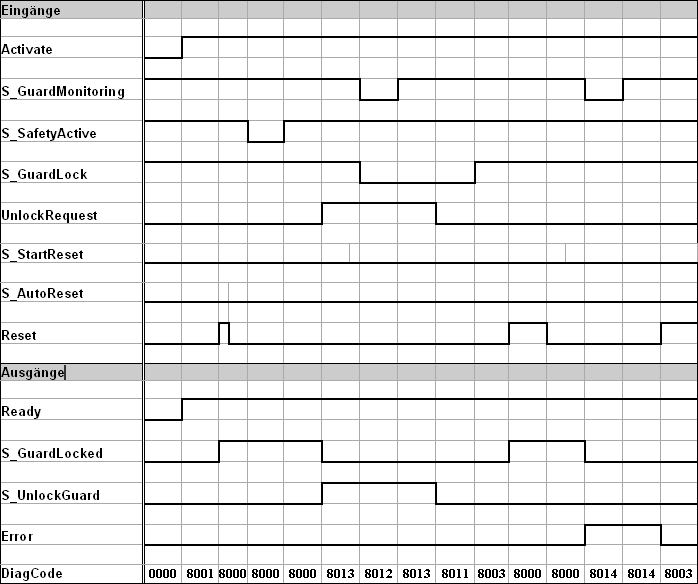
In case of an error event, the outputs S_GuardLocked and S_UnlockGuard are set to FALSE, the DiagCode output shows the relevant error code, and the Error output is set to TRUE.
An error must be acknowledged by a rising trigger edge at the Reset input.
Table 47. FB-specific error codes
|
|
Statue Name |
Status description and output setting |
|---|---|---|
|
|
|
Static reset detected in state
|
|
|
|
Static reset detected in status
|
|
|
|
Static reset detected in state
|
|
|
|
No more safe state; guard open or guard locking unlocked
|
Table 48. FB-specific status codes (no error)
|
|
Statue Name |
Status description and output setting |
|---|---|---|
|
|
|
The function block is not active (basic state).
|
|
|
|
The guard is locked.
|
|
|
|
FB has been activated and initialized.
|
|
|
|
Door is closed and locked; wait for
|
|
|
|
Wait for operator to either request an unlock or reset.
|
|
|
|
The guard is unlocked and open.
|
|
|
|
The guard is closed but unlocked.
|
|
|
|
The
Error = FALSE |