
|
Tip |
|---|---|
|
The version of the function block as described here corresponds to the latest version of the function block in Version list of function blocks. |
SF_Equivalent is a certified PLCopen function block. For detailed information about applied standards, see "PLCopen – Technical Committee 5 – Safety Software".

|
Important |
|---|---|
|
The requirements listed in the standards must be fulfilled by the user. |
This function block links two equivalent SAFEBOOL inputs (both NO or NC) to a SAFEBOOL output under discrepancy time monitoring. This FB should not be used stand-alone since it has no restart interlock. It is required to connect the output to other safety related functionalities.
Table 13. VAR_INPUT
|
Name |
Data Type |
Initial Value |
Description, parameter values |
|---|---|---|---|
|
|
|
|
|
|
|
|
|
Variable Input
|
|
|
|
|
Variable Input
|
|
|
|
|
Constant Maximum monitoring time for discrepancy state of both inputs The |

|
DiscrepancyTime |
|---|---|
|
For developers in Extended Level: The |
Table 14. VAR_OUTPUT
|
Name |
Data Type |
Initial Value |
Description, parameter values |
|---|---|---|---|
|
|
|
|
|
|
|
|
|
Safety-related output
|
|
|
|
|
|
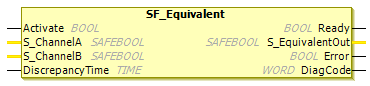
This function block links two equivalent SAFEBOOL inputs (both NO or NC) to a SAFEBOOL output under discrepancy time monitoring. The two A and B channels are interdependent. The output of the function block shows the evaluation result of both channels.
If the channel signal changes from TRUE to FALSE, the output immediately switches off (FALSE) for safety reasons.
Discrepancy time monitoring: The discrepancy time is the maximum period during which both inputs may have different states without the function block detecting an error. Discrepancy time monitoring starts when the status of an input changes. The function block detects an error when both inputs have different states once the discrepancy time has elapsed.
Both inputs must be switched symmetrically. This means that monitoring is performed for both inputs for switching from TRUE to FALSE as well as for switching from FALSE to TRUE.
Table 15. Logic table of inputs/outputs
|
Inputs |
Outputs |
||||||
|---|---|---|---|---|---|---|---|
|
|
|
|
|
|
|
|
|
|
|
|
|
Not started |
|
|
|
|
|
|
|
|
Not started |
|
|
|
|
|
|
|
|
Started |
|
|
|
|
|
|
|
|
Started |
|
|
|
|
|
|
|
|
Not started |
|
|
|
|
|
|
|
|
Started |
|
|
|
|
|
|
|
|
Started |
|
|
|
|
|
|
|
|
Started |
|
|
|
|
|
|
|
|
Started |
|
|
|
|
|
|
Tip |
|---|---|
|
In the logic table, an arrow (->) stands for a transition. |
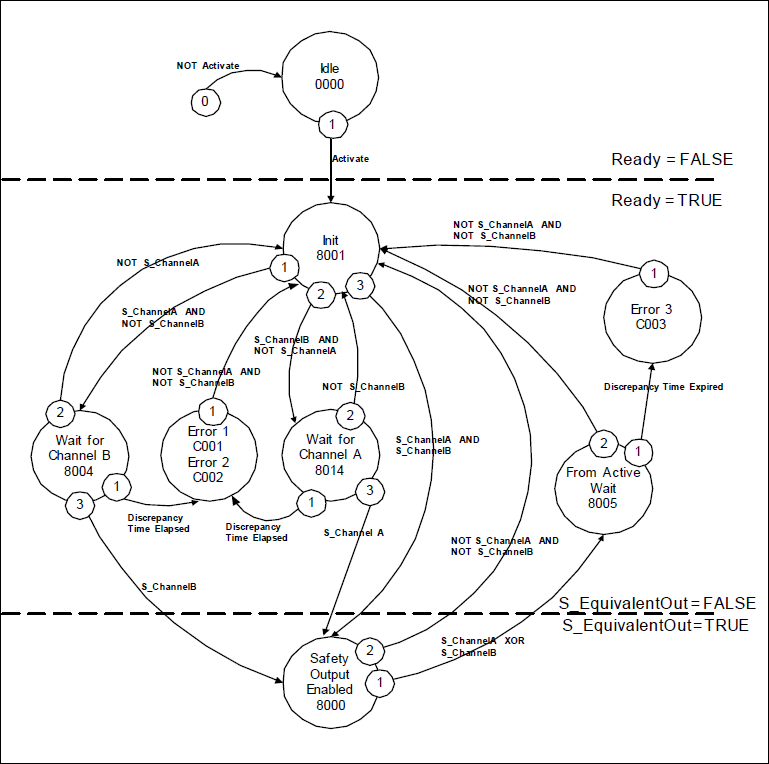
|
|
Tip |
|---|---|
|
Note: The transition from any state to the |
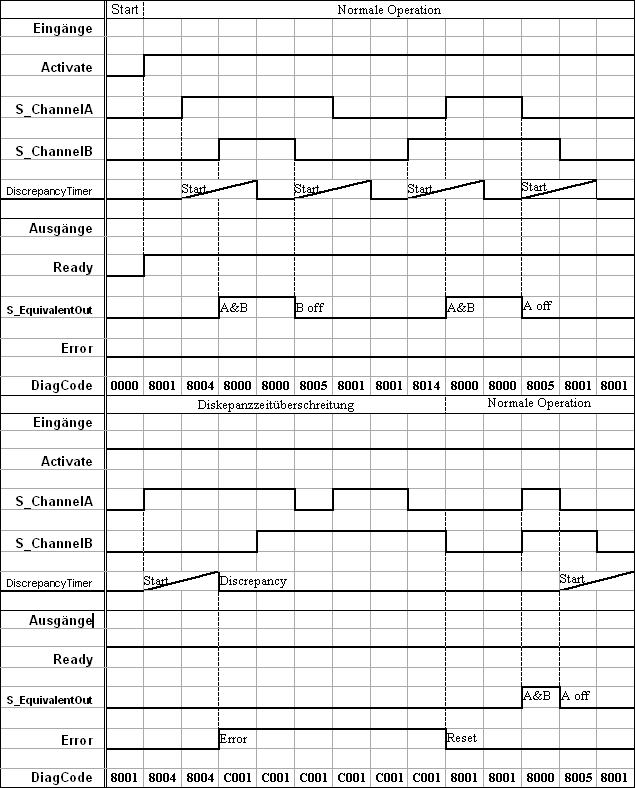
The function block monitors the discrepancy time between channel Channel A and channel Channel B, when switching to TRUE as well as switching to FALSE.
S_EquivalentOut is set to FALSE. Error is set to TRUE. DiagCode displays the error status. There is no Reset defined as an input coupled with the reset of an error. As soon as a Set of input values with the correct S_EquivalentOut is present, Error is FALSE again.
Table 16. FB-specific error codes
|
|
Statue Name |
Status description and output setting |
|---|---|---|
|
|
|
Discrepancy time expired in status
|
|
|
|
Discrepancy time expired in status
|
|
|
|
Discrepancy time expired in status
|
Table 17. FB-specific status codes
|
|
Statue Name |
Status description and output setting |
|---|---|---|
|
|
|
The function block is not active (basic state).
|
|
|
|
The block has been activated.
|
|
|
|
The inputs are switched to
|
|
|
|
Channel
|
|
|
|
Channel
|
|
|
|
One channel has been switched to
|