SF_TwoHandControlTypeII

[Tip] Tip

The version of the function block as described here corresponds to the latest version of the function block in Version list of function blocks.

Applicable safety standards

SF_TwoHandControlTypeII is a certified PLCopen function block. For detailed information about applied standards, see "PLCopen – Technical Committee 5 – Safety Software".

[Important] Important

The requirements listed in the standards must be fulfilled by the user.

Interface description

This function block supports the "two-hand control type 2" function in an application according to the European standard.

Table 36. VAR_INPUT

Name

Data Type

Initial Value

Description, parameter values

Activate

BOOL

FALSE

General input parameters

S_Button1

SAFEBOOL

FALSE

Variable.

Input for button 1 (for category 3 or 4: two antivalent contacts)

FALSE: Button 1 is released.

TRUE: Button 1 is pressed.

S_Button2

SAFEBOOL

FALSE

Variable.

Input for button 2 (for category 3 or 4: two antivalent contacts)

FALSE: Button 2 is released.

TRUE: Button 2 is pressed.


Table 37. VAR_OUTPUT

Name

Data Type

Initial Value

Description, parameter values

Ready

BOOL

FALSE

General output parameters

S_TwoHandOut

SAFEBOOL

FALSE

Safety-oriented output signal

FALSE: No correct two-hand control

TRUE: The S_Button1 and S_Button2 inputs are TRUE and no error occurred. Correct two-hand control

Error

BOOL

FALSE

General output parameters

DiagCode

WORD

16#0000

Diagnostic codes


[Tip] Tip

No Reset input or error output is required, because no test can be performed on either switch.

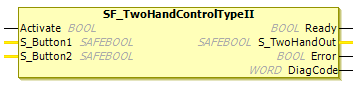
Figure 73. Function block: SF_TwoHandControlTypeII

Function block: SF_TwoHandControlTypeII

Functional description

This FB supports the "two-hand control type 2" function according to the European standard. If S_Button1 and S_Button2 are set to TRUE in the correct sequence, then the S_TwoHandOut output is also set to TRUE. The FB also checks the release of both buttons before the S_TwoHandOut output is set to TRUE again.
Status diagram

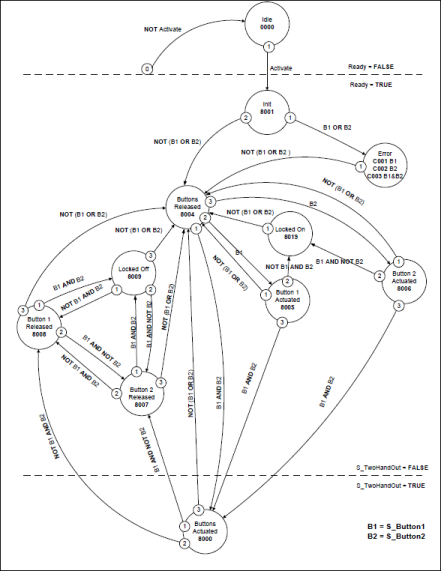
Figure 74. Status diagram: SF_TwoHandControlTypeII

Status diagram: SF_TwoHandControlTypeII

[Tip] Tip

Note: The transition from any state to the Idle state, initiated by Activate = FALSE, is not shown. In every case, these transitions have the highest priority.

Typical timing diagram

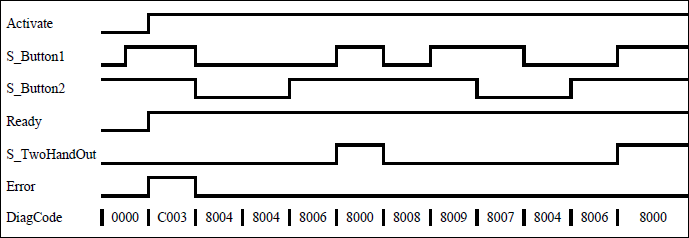
Figure 75. Timing diagram: SF_TwoHandControlTypeII

Timing diagram: SF_TwoHandControlTypeII

Error detection

After activating the FB, setting any pushbutton to TRUE is recognized as an invalid input signal, which leads to an error.

Error behavior

In case of an error event, the S_TwoHandOut output is set to FALSE and remains in this safe state. The error state is exited when both pushbuttons are released (set to FALSE).

FB-specific error and status codes

Table 38. FB-specific error codes

DiagCode

Statue Name

Status description and output setting

16#C001

Error B1

S_Button1 was TRUE at block activation

Ready = TRUE

Error = TRUE

S_TwoHandOut = FALSE

16#C002

Error B2

S_Button2 was TRUE at block activation

Ready = TRUE

Error = TRUE

S_TwoHandOut = FALSE

16#C003

Error B1&B2

The signals at S_Button1 and S_Button2 were TRUE at block activation

Ready = TRUE

Error = TRUE

S_TwoHandOut = FALSE


Table 39. FB-specific status codes (no error)

DiagCode

Statue Name

Status description and output setting

16#0000

Idle

The function block is not active (basic state).

Ready = FALSE

Error = FALSE

S_TwoHandOut = FALSE

16#8000

Buttons Actuated

Both buttons correctly activated. The safety-oriented output is activated.

Ready = TRUE

Error = FALSE

S_TwoHandOut = TRUE

16#8001

Init

Block is active, but in base state

Ready = TRUE

Error = FALSE

S_TwoHandOut = FALSE

16#8004

Buttons Released

No button is pressed

Ready = TRUE

Error = FALSE

S_TwoHandOut = FALSE

16#8005

Button 1 Actuated

Only Button 1 is pressed.

Ready = TRUE

Error = FALSE

S_TwoHandOut = FALSE

16#8006

Button 2 Actuated

Only Button 2 is pressed.

Ready = TRUE

Error = FALSE

S_TwoHandOut = FALSE

16#8007

Button 2 Released

The safety-oriented output was activated and deactivated again.

FALSE at both inputs S_Button1 and S_Button2 was not reached after deactivation of the safety-oriented output.

In this state, S_Button1 = TRUE and S-Button2 = FALSE after deactivation of the safety-oriented output.

Ready = TRUE

Error = FALSE

S_TwoHandOut = FALSE

16#8008

Button 1 Released

The safety-oriented output was activated and deactivated again.

FALSE at both inputs S_Button1 and S_Button2 was not reached after deactivation of the safety-oriented output.

In this state, S_Button1 = FALSE and S_Button2 = TRUE after deactivation of the safety-oriented output.

Ready = TRUE

Error = FALSE

S_TwoHandOut = FALSE

16#8009

LockedOff

The safety-oriented output was activated and deactivated again.

FALSE at both inputs S_Button1 and S_Button2 was not reached after deactivation of the safety-oriented output.

In this state, S_Button1 = TRUE and S_Button2 = TRUE after deactivation of the safety-oriented output.

Ready = TRUE

Error = FALSE

S_TwoHandOut = FALSE

16#8019

LockedOn

Incorrect operation of the buttons. Wait for both buttons to be released.

Ready = TRUE

Error = FALSE

S_TwoHandOut = FALSE