Identifying the friction characteristic
How to complete the friction compensation procedure:
1.
Check the identified friction setpoint values for plausibility.
If necessary: Correct friction setpoints in the parameter Friction curve - value. 0x5052:046, 047, 048, 049, 050, 051, 052, 053, 054, 055, 056, 057, 058, 059, 060, 061, 062, 063, 064, 065, 066, 067, 068, 069, 070, 071, 072, 073, 074, 075, 076, 077, 078, 079, 080, 081, 082, 083, 084, 085, 086, 087, 088, 089, 090, 091, 092, 093, 094, 095, 096, 098, 099, 100, 101, 102, 103, 104, 105, 106, 107, 108, 109, 110, 111
If necessary: Correct friction setpoints in the parameter Friction curve - value.
0x5052:046, 047, 048, 049, 050, 051, 052, 053, 054, 055, 056, 057, 058, 059, 060, 061, 062, 063, 064, 065, 066, 067, 068, 069, 070, 071, 072, 073, 074, 075, 076, 077, 078, 079, 080, 081, 082, 083, 084, 085, 086, 087, 088, 089, 090, 091, 092, 093, 094, 095, 096, 098, 099, 100, 101, 102, 103, 104, 105, 106, 107, 108, 109, 110, 1112.
Save parameter set on device.
The friction characteristic has now been saved.
The friction compensation is complete.

The friction is dependent on the speed. The friction is not dependent on the load and the diameter.
In order to identify the friction, there must not be any material on the winding shaft, as it would otherwise not be possible to accelerate the reel to the maximum speed.
During the identification, the drive is accelerated and decelerated. During the acceleration and deceleration, the torques are saved. These torques constitute the friction characteristic. In later winding operations, the speed-dependent torques must be compensated for.
How to identify the friction:
1.
Set the parameter Friction identification - max. speed [%] ... 100 [%]. 0x5052:038
0x5052:0382.
Adapt the parameter Friction identification - acceleration to the basic conditions. 0x5052:039
0x5052:039The torque must be sufficient for accelerating the mass inertia up to the parameter Friction identification - max. speed. 0x5052:038
0x5052:038A rising FALSE-TRUE edge 0x5052:042
↗
at the control bit Friction curve determination starts the identification run. 0x5052:042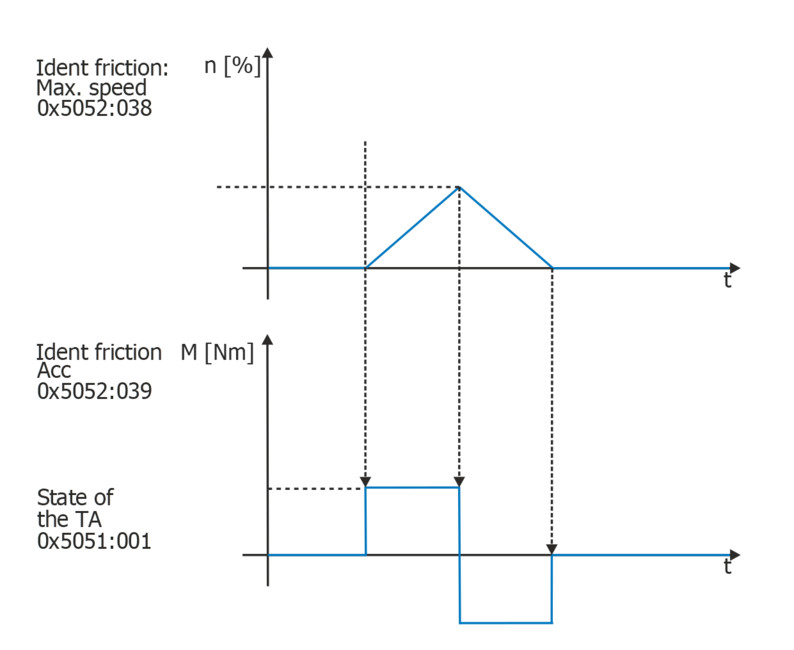
Fig. 1: Identification profile
How to optimise the friction identification process:
1.
Set the parameter Friction identification - speed filter. 0x5052:040
0x5052:0402.
Set the parameter Friction identification - torque filter. 0x5052:041
0x5052:041The parameters will be filtered. This improves the curve of the identified characteristic.
Parameter