Edit date/time formatting
Dialog for editing a date/time formatting.
The dialog appears when you add a parameter of the System time type in the Edit Localizable Text dialog and click the button with the three dots  under Date/Time format.
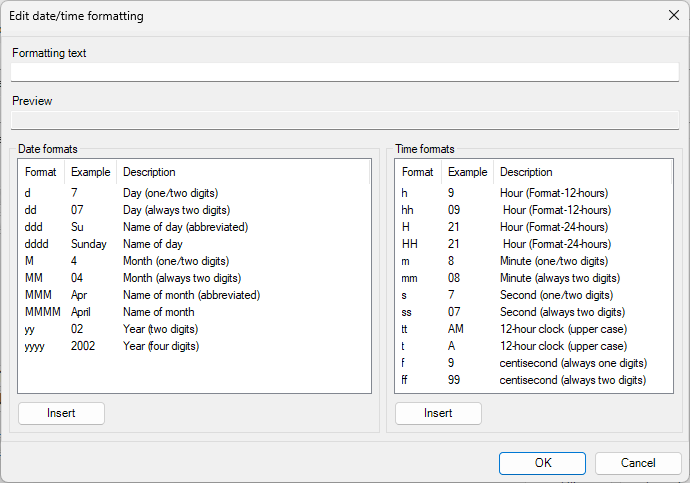
Edit date/time formatting dialog
Elements of the dialog
-
Formatting text
-
Contains the formatting instructions for a timestamp. The instructions can be composed of individual elements from the Date formats or Time formats. You must also enter separators between the individual formats in this formatting text.
This dialog is called from the text editing of a specific language. This means the order of the formats and the separators are country-specific.Example:
German (Germany)
English (United States)
Formatting text
dd.MM.yyyy HH:mm:ssMM/dd/yyyy hh:mm:ss ttExample
30.04.2025 14:40:50
04/30/2025 02:40:50 PM
-
-
Preview
-
Displays a timestamp using the selected formatting instruction.
-
-
Date formats
-
The list contains the supported formatting options for a date.
-
-
Time formats
-
The list contains the supported formatting options for a time.
-
-
Insert
-
Inserts the selected date format or time format into the formatting text.
-