Edit Localizable Text
Dialog for editing a localizable text.
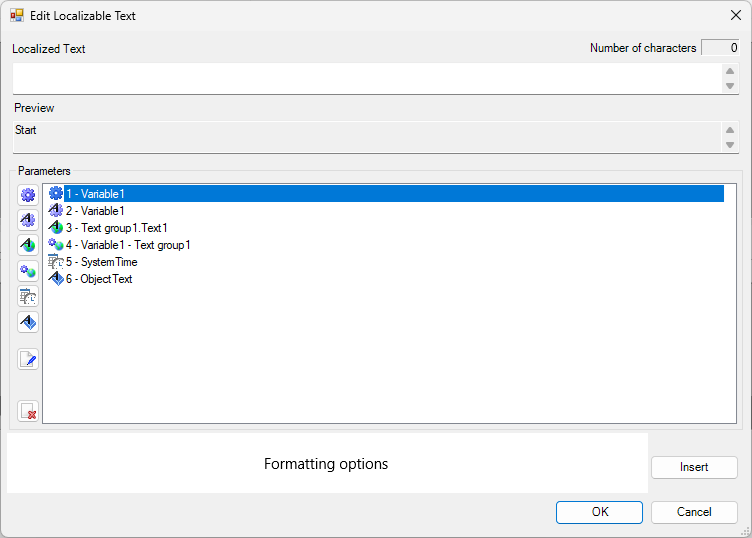
Edit Localizable Text dialog
Elements of the dialog
-
Localized text
-
The text field contains the localized text, including formatting instructions.
-
-
Number of characters
-
Displays the number of characters in the
Localized textfield.If parameters are formatted into the text, this value does not represent the number of characters at runtime, as parameter values may change.
-
-
Preview
-
Shows the contents of the localizable text field with interpreted format statements.
-
-
Parameters
-
This area contains optional parameters used for formatting. Various parameter types can be added via the buttons:
-
 Variable value
-
The value of a process variable.
-
-
 Variable text
-
The label text of a process variable (Text parameter of the variable definition).
-
-
 Localizable text
-
Another localizable text.
-
-
 Localizable text dependent on a variable
-
A localizable text retrieved from a text group based on the value of a process variable.
-
-
 System time
-
The current system time with time and/or date.
-
-
 Object text
-
The text of another object. For a list of referenced objects, see below.
-
-
-
 Edit
-
Opens the Edit parameter dialog for the selected parameter.
Double-clicking a parameter also opens this dialog.
-
-
 Delete
-
Deletes the selected parameter from the list.
Only the parameter itself is deleted from the list. Any existing integration of the parameter within the localizable text must be deleted separately.
-
-
Formatting options
-
This section contains formatting options that allow to use dynamic data in localizable texts. The formatting options are displayed depending on the parameter type. They are explained in the following section.
-
-
Insert
-
Inserts the selected formatting instruction with the configured parameters into the localized text.
-
Formatting options
Depending on the selected parameter, the area contains different formatting instructions.
-
Numerical representations
-

-
Numerical formatting
-
Number
-
With this formatting, the specifications in the Integral digits and Fractional digits fields are observed.
-
-
Auto. floating
-
Displays dynamically integrated values (as they are) with fractional digits.
-
-
Scientific
-
Sets the output format of a dynamically integrated value to scientific notation.
-
-
Hexadecimal
-
Sets the output format of a dynamically integrated value to hexadecimal notation.
-
-
Binary
-
Sets the output format of a dynamically integrated value to binary notation.
-
-
-
Fractional digits
-
Specifies the number of digits after the decimal point.
-
-
Integral digits
-
Specifies the number of digits before the decimal point.
-
-
Leading zeros
-
Specifies that the number of integral digits should be padded with leading zeros.
-
-
-
-
Date/time representations
-
-
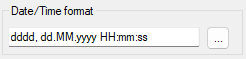
Date/Time format
-
Integrates the system time into the text at runtime using the selected formatting. Clicking the
 button opens the dialog for selecting a date/time format.
-
-
-
The operation and parameter formatting of the dialog differ depending on the project type:
-
Single, Standard Server
-
Edit Localizable Text (Standard Server)
-
-
Modern UI Client, Cross Platform Server, version 7.4 and later
-
Edit Localizable Text (Cross Platform Server 7.4+)
-
Related topics: