Edit parameter
Dialog for editing a parameter in a localizable text.
The dialog appears when you click the button with the pencil icon  in the Edit Localizable Text dialog.
The settings in the dialog differ depending on the previously selected parameter type.
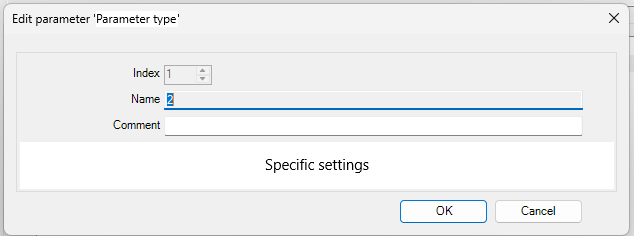
Edit parameter ‘[Parameter type]’ dialog
Elements of the dialog
The following elements are available in the dialog regardless of the parameter type.
-
Index
-
The index is automatically generated when the parameter is added to the parameter list in the Edit Localizable Text dialog and cannot be changed.
-
-
Name
-
The name corresponds to the position of the parameter in the parameter list and cannot be changed.
-
-
Comment
-
Any comment regarding the parameter.
-
Specific settings
These settings are available in the dialog depending on the selected parameter type.
-
Save
-
Determines whether the parameter value is stored in the hinstory. This setting only has an effect if the parameter has been formatted into a text used in the alarm or logging system.
-
-
Variable name
-
Applies to:
Variable value,Variable text,Localizable text dependent on a variableDefines the full variable name.
-
-
Avoid cache
-
Applies to:
Variable valueDetermines the source from which the displayed variable value is obtained.
-

True-
Reads the variable value directly from the process (PLC). This results in a certain delay, as the value must be read from an external component across several layers.
-
-

False-
Uses the variable value from the variable cache. The value is available immediately.
-
-
-
Use Unit conversion
-
Applies to:
Variable valueDetermines whether the unit conversion resulting from the unit classes assigned to the variable is applied to the displayed value.
-
-
Use UTC
-
Applies to:
System timeDetermines whether the current system time is displayed in UTC format.
-
-
Localizable text
-
Applies to:
Localizable textDefines the full name of the text.
-
-
Text group
-
Applies to:
Localizable text dependent on a variableDefines the full name of the text group.
-