Select Localizable Text
All controls that display texts from the language switching system contain the LocalizableText property. In the Properties window, this property includes a button  to open the Select Localizable Text dialog.
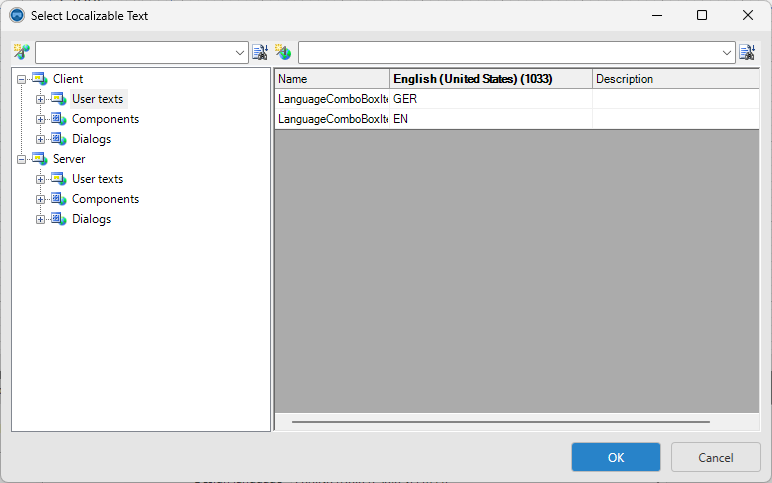
Select Localizable Text dialog
The Select Localizable Text dialog lists the texts from the language switching system in a hierarchical form. New texts and text groups can be created within this dialog.
If, for example, a label is to be linked to a localizable text, there are two ways to proceed:
-
The text has already been defined in the language switching editor
-
Use the text group view on the left side to navigate to the desired text group. Then, select the corresponding text from the text list on the right. Clicking OK closes the dialog and establishes the link to the text.
-
-
The text has not yet been defined
-
Select the desired group in the text group view. You can then create a new text using the New text button
 . A new text group can also be created using the New group button
 . The link to the newly created text is again established by selecting the text and then closing the dialog by clicking OK.
-
-
Within the Select Localizable Text dialog, texts are only displayed in the developer language. This language can be switched in the Project Explorer under the Project configuration > Global node on the Language tab.
-
The Select Localizable Text dialog includes two search functions: In the search field on the left side, you can enter part of a full text identifier (i.e., the full text group path together with the actual text name). The dialog navigates to the first matching hit as you type. Navigation to the next hit is triggered via the Find next in full name button
 .
-
In addition to searching for text names, you can also search for text content. Enter a search term in the second input field on the right side of the dialog. Navigation to the next hit is initiated via the Find next in column... button
.