Behave on software limit (subindex 53 )
|
|
|||||||||||||
|
Behaviour of software limit position monitoring |
|||||||||||||
|
Selection list (Lenze setting printed in bold) |
Info |
||||||||||||
|
0 |
StopAfterLimit |
Stopping behind the limit |
|||||||||||
|
1 |
StopOnLimit |
Stopping on the limit |
|||||||||||
|
|
UNSIGNED_16 |
||||||||||||


Behaviour in case of active software limit positions
If the software limit positions are active, travelling commands that would result in exiting from the permissible travel range can no longer be executed:
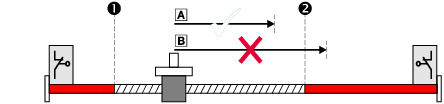


 [4-15] Example: Traversing range limitation by means of software limit positions
If the axis is already outside the permissible travel range and the software limit positions have been activated, only travel commands that result in the axis moving back into the permissible travel range can be executed:
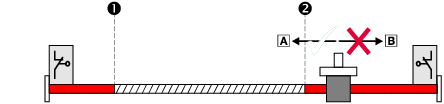
[4-16] Example: Permissible traversing direction if software limit positions active
If the software limit positions are active and a software limit position is passed ("overtravel"):
-
The error message "SWLimitPos" or "SWLimitNeg" is generated.
-
The output SWLimitSwitchPos or SWLimitSwitchNeg of the FB MC_ReadAxisInfo is set to TRUE.
-
The axis state changes to "ErrorStop", i.e. the axis is braked to a standstill depending on the error response configured in subindex 105 .
-
The axis can only be traversed again after the error has been acknowledged via
MC_Reset
.