Controller.NTP
To synchronize the time of the Controller to a central time server, the NTP Client and / or the NTP Server can be used
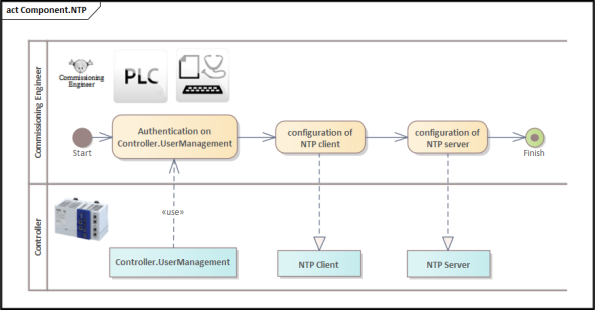
Activity Diagram
To set up the time manually, the following parameters can be used:
Parameters for configuring the datetime
|
Address |
Name /Setting Range / [Default] |
Info |
|---|---|---|
|
0x245B:002 |
System time: Current time |
This is the datetime for the main system of the Controller. |
|
0x245C:001 |
Local time: Current timezone |
This is the configuration of the local timezone. |
|
0x245C:002 |
Local time: Current time |
This is the local time in the timezone. |
To change to the NTP client functionality, the following parameters are necessary:
Parameters for configuring the datetime
|
Address |
Name /Setting Range / [Default] |
Info |
|---|---|---|
|
0x245B:001 |
openSystem time: Time base |
Please switch from manually set [2] to NTP [0] |
|
0x245A:002 0x245A:003 0x245A:004 0x245A:005 |
NTP server addresses: NTP server address 1 NTP server addresses: NTP server address 2 NTP server addresses: NTP server address 3 NTP server addresses: NTP server address 4 |
NTP server addresses |
After the parameter set is saved, the new configuration is active.
-
The datetime will be synchronized via the NTP client from the NTP server
* once after activation of the NTP client and
* once during the boot process of the controller and
* cyclically every 60 Minutes during operation.
Since firmware version 1.12, there is also a NTP Server available on the c5x0 Controller. To activate this NTP Server the following parameter can be used:
Parameters for configuring the NTP server
|
Address |
Name /Setting Range / [Default] |
Info |
|---|---|---|
|
0x245B:003 |
System time:_ NTP server Deactivated [0] Activated [1] |
|
After the parameter set is saved, the NTP Server is active and available under udp/123 port.
-
If the NTP server is not available after activation, please check the Controller.Firewall settings for this port. NTP server and NTP client are using the same port ‘123’.