Controller.OPCUAClient.Authentificate
This function has been available since firmware version 01.09.00 of the controller.
To be able to use an OPC-UA Client, the complete communication must be programmed in the »PLC Designer«. The »PLC Designer« therefor provides several function blocks:
-
UA_Connect
-
UA_Disconnect
-
UA_NamespaceGetIndexList
-
UA_ConnectionGetStatus
-
UA_NodeGetHandleList
-
UA_NodeReleaseHandleList
The authentication of the OPC-UA Client is done by the function block "UA_Connect". The authentication handling is done by the input structure "UserIdentityToken" and "SessionConnectInfo".
To establish a connection to the OPC-UA Server, an OPC-UA Client must use the endpoint url and take the corresponding security settings into account. The architecture of OPC-UA provides for a secure channel and a session. Confidentiality and integrity are secured for the Secure Channel and authentication and authorization for the session.
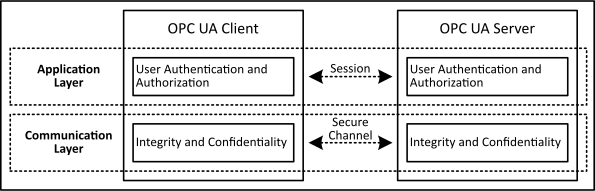
Security Channel and Session
These security settings are described below. Here, the "SecurityMsgMode", Security Policy and "UserIdentityToken" are used for the Secure Channel configuration and the authentication for the session.
SecurityMsgMode
The variable is part of the "SessionConnectInfo"structure. The following list shows the options that can be selected.
-
BestAvailable
Best available message security mode to the UA server. The client receives the available message security from the server and selects the best. This could also result in level “none security”.
-
None
No security is applied.
-
Sign
All messages are signed but not encrypted.
-
SignEncrypt
All messages are signed and encrypted.
Security Policy
When the connection between OPC-UA Client and OPC-UA Server is started, the security policies are transmitted by the server. Within this Cipher Suite, the OPC-UA Client can select a suitable connection. Several settings are usually offered here, such as Basic256Sha256.
This is done by the "SecurityPolicy" variable which is part of the "SessionConnectInfo" structure.
The "SecurityPolicy" specifies the type of encryption of the transaction. The options available are Best Available, None, Basic256Sha256 and Aes256Sha256RsaPss.
-
BestAvailable
Best available message security mode to the UA server. The client receives the available message security from the server and selects the best. This could also result in level “none security”.
-
None
-
Basic256Sha256
-
Aes256Sha256RsaPss
http://opcfoundation.org/UA/SecurityPolicy#Aes256_Sha256_RsaPss
UserIdentityToken
In "UserIdentityToken", the user is associated with the session. This is not used to encrypt the transaction. This is used to identify the user at the server. The following three settings are possible.
-
Anonymous
No dedicated user is used for the session, but the connection is created anonymously.
-
Username and Password
A user must identify himself with username and password and will be associated with the session.
-
Certificate and Private Key
Authentication of a user with the help of certificates. Not currently supported.
Authenticate an OPC-UA Client without an activated user management
In the following, the connection to the OPC-UA Server is described without user management being activated on the controller. An OPC-UA Client can connect without having to authenticate the user.
-
In the »PLC Designer«, the following setting option exists for the device: Device > Communication Settings > Device > Change Runtime Security Policy ... > [Checkbox] Allow anonymous login. Without an activated user management, the following setting in the »PLC Designer« has no effect, i.e. when deselecting Allow anonymous login, an anonymous connection is possible.
-
If an OPC-UA client with a username and password authentication connects to the OPC-UA server without active user management, a connection is generally possible. Neither the username nor the password is checked, as there is no activated user management with corresponding data. The connection is therefore synonymous with anonymous authentication.
Anonymous
Regardless of the user in the user management, OPC-UA Clients can dial in anonymously with this authentication mode, if allowed by the OPC-UA Server.