Controller.CertificateStore.HAProxy
Secure Communication has been available since FW version 01.04.00.
Handling the certificate for the Secure Communication in the Controller.CertificateStore has been available since FW version 01.11.00.
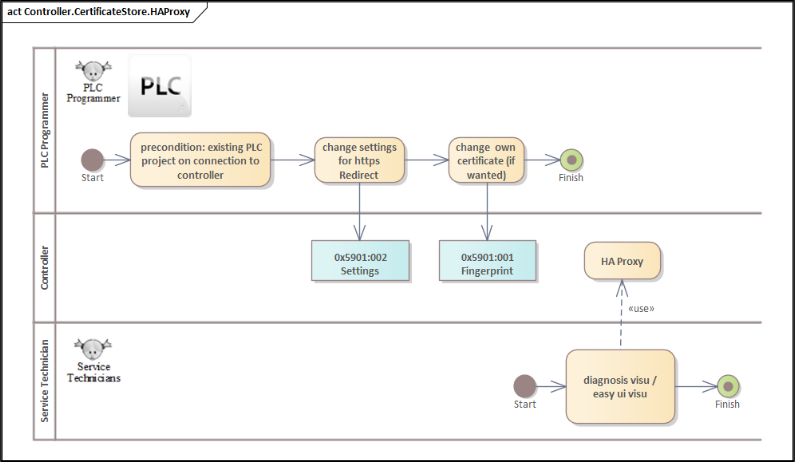
Activity Diagram
The controller supports communication via the HTTP and HTTPS. Using the HTTPS instead of HTTP offers your data additional protection against unauthorized access. This is because the transmission is encrypted and there are authentication possibilities. However, these additional functionalities can only be achieved through increased resource consumption and organizational effort.
When selecting a communication protocol, consider the given network structure,security needs,capabilities of the web application, and effort (administrative and resource-related).
Delivery Condition
By default, the controller offers both http and HTTP and HTTPS protocols for various services. It is therefore a decision of the users whether they communicate encrypted (https) or unencrypted (http). For example, a web browser can load a website of the controller via HTTP or HTTPS.
For HTTPS communication, the controller uses a self-signed certificate, which is generated when the hardware is started for the first time. Users can verify this certificate and authenticate the server.
This certificate is not backed up during a backup / device replacement. In the event of a hardware replacement, the users must therefore trust the new certificate.
Parameters for Displaying the Certificate Fingerprint
The 0x5901:001 parameter displays the fingerprint of the certificate that the controller uses to identify itself to the client during an HTTPS connection. To authenticate the server, the string displayed here must exactly match the fingerprint of the server certificate displayed in the web client (e.g., web browser).
|
Address |
Name / Setting Range / [Default] |
Info |
|---|---|---|
|
0x5901:001 |
Certificate fingerprint Display only |
Fingerprint of Certificate for https/wss communication |
Visualization
The controller provides a visualization system with built-in user management. Login data is considered particularly sensitive information. For this reason, an HTTPS connection with configured user management is recommended for visualization.
To prevent the use of HTTP in the context of visualization, the controller redirects client requests for visualization content to HTTPS. Redirection is an instruction to the user to switch to an HTTPS connection. While a user is not forced to follow this instruction, all current browser versions should fulfill it.
Parameters for Configuring the https Forwarding of the Visualization
By default forwarding visualization content to an https connection is deactivated. To enable forwarding, the parameter 0x5901:002 must be set to "1".
This parameter represents a security-critical functionality. Therefore, it cannot be changed by engineering tools such as the »EASY Starter« or the »PLC Designer«. The application program can only change the parameter value by appropriately controlling the "L_IPAP_ChangeHttpsRedirectSetting4EasyUI" function block.
The function block "L_IPAP_ChangeHttpsRedirectSetting4EasyUI" is included in the library "L_IPAP_ParameterManagerAccess" as of version 03.24.00 of the »PLC Designer«. This function block enables changing the configuration to "Disabled. Https redirect for EASY UI." or "Enabled. Https redirect for EASY UI.", by writing the appropriate enumeration value to the parameter.
After changing the parameter value, the settings are loaded by the firmware and necessary services are restarted. This can lead to disconnections in the web application. For this reason, among other, it is recommended to write the parameter value only if a new setting is required.
The parameter setting is stored permanently on the device. The setting is not transferred during a device replacement/backup. Therefore, if new hardware is used, the parameter must be set again by the application program.
|
Address |
Name / Setting Range / [Default] |
Info |
|
|---|---|---|---|
|
0x5901:002 |
Https redirect setting |
Display of the current setting |
|
|
0 |
Disabled. Https redirect for EASY UI. |
http and https requests for visualization content are answered directly |
|
|
1 |
Enabled. Https redirect for EASY UI. |
http requests for visualization content are answered with a redirect, which prompts the client to use an https connection |
|
|
2 |
Changing. Https redirect for EASY UI. |
Status feedback only |
|
|
3 |
No access. HAProxy not active. |
||
-
Up to version 01.10.00 this redirect only applies to the diagnosis pages (i.e. pages beginning with /diagnosis) and the Easy UI project pages (i.e. pages beginning with /easyui). From version 01.11.00 on wards, the redirect also applies to the actual landing page of the controller and to all HTML pages stored on the SD card by the customer.
Troubleshooting
Web client (e.g., a browser) reports security risks when establishing a connection
As the controller uses self-signed certificates, clients such as web browsers cannot automatically authenticate the server (the controller). This is because clients determine the authenticity of a certificate, and thus of a server, by checking the certificate signature. This check fails for self-signed certificates because they were issued by a certification authority that is unknown and therefore not trustworthy to the client.
To check the authenticity manually, the certificate fingerprint from the above parameter can be read out with an engineering tool such as the »EASY Starter« or the »PLC Designer« and compared with the fingerprint of the certificate received in the web client (e.g. web browser). If the two fingerprints match exactly, it is probably the correct server (complex attacks can be deceiving here).
If the authenticity is established, an exception can be added to the browser for this address and the connection can be continued.
It is recommended to include an exception in the security check for this address only. For security reasons, installing the certificate so that it can be used to authenticate other addresses is not permitted.
Website is not working correctly with https
A website can have complex communication channels and load content from different sources, as well as communicate bidirectionally. If a website is loaded via https instead of http, conflicts can easily arise because https requires different resources/addresses and sets new requirements for the web application.
Typically, conflicts arise due to fixed specifications within the website. The most common causes of errors are the rigid specification of a port number and the fixed specification of the communication paths (secured/unsecured). The port number often causes a problem because https is typically offered on a different port than http. The fixed specification of a communication path leads, for example, to problems if unsecured communication is to be made from a website loaded via https. In such cases, most browsers will refuse communication due to the security risk. For example, it is not allowed to open an unsecured web socket or embed http content within an https site.