Example: Jog forward/Jog reverse
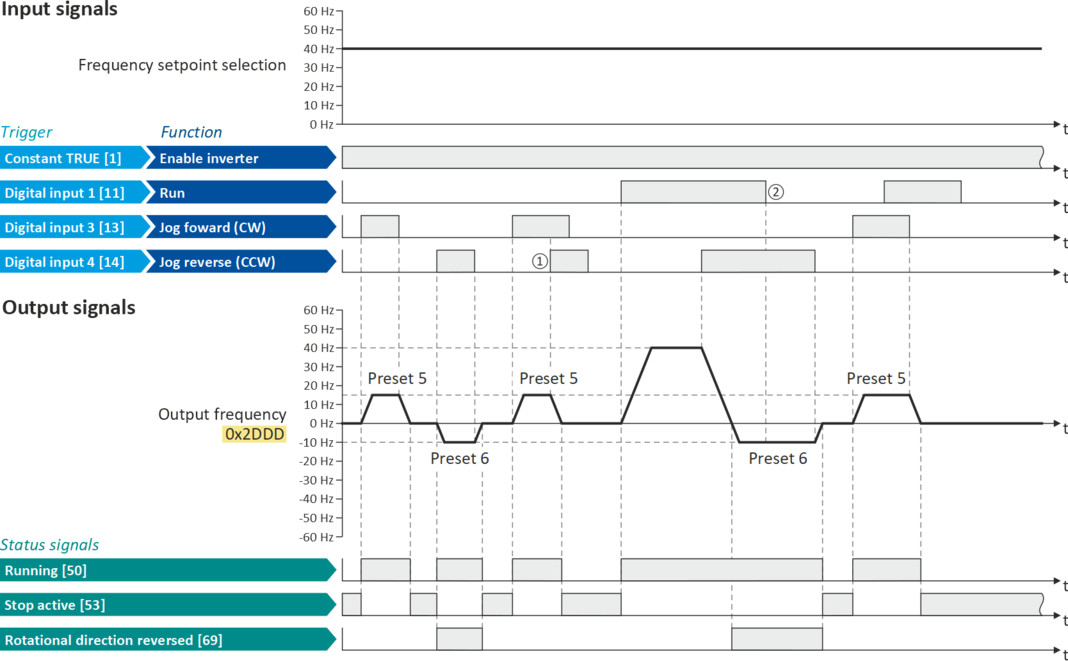
This example shows the functions "Jog forward (CW)" and "Jog reverse (CCW)" for Jog operation.
–
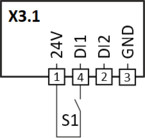
The switch S1 starts the motor in the forward direction of rotation. The switch S1 in the initial position stops the motor again.
–
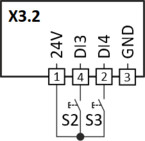
The button S2 starts the motor in the forward direction of rotation with frequency preset 5.
–
The button S3 starts the motor in the backward direction of rotation with frequency preset 6.
–
The motor rotates in jog operation as long as the respective button is pressed. If both buttons are pressed at the same time, the motor is stopped.
 CAUTION!
The jog operation has a higher priority than the "Run" function, all other start commands.
If jog operation is active, the motor cannot be stopped with the previously mentioned functions!
▶
The jog operation is stopped by cancelling the functions "Jog forward (CW)"/"Jog reverse (CCW)".
▶
The jog operation can be interrupted with the "Activate quick stop" 0x2631:003 function.
|
Connection diagram
|
Function
|
||
|
|
|
Switch S1
|
Run
|
|
Button S2
|
Jog forward (CW)
|
||
|
Button S3
|
Jog reverse (CCW)
|
||
|
Parameter
|
Name
|
Setting for this example
|
|
Plug X3.1 configuration
|
DI2 + DI1 [1]
|
|
|
Plug X3.2 configuration
|
DI4 + DI3 [1]
|
|
|
Enable inverter
|
Constant TRUE [1]
|
|
|
Run
|
Digital input 1 [11]
|
|
|
Jog forward (CW)
|
Digital input 3 [13]
|
|
|
Jog reverse (CCW)
|
Digital input 4 [14]
|
|
|
Frequency control: Default setpoint source
|
Frequency preset 2 [12]
|
|
|
Frequency setpoint presets: Preset 2
|
40.0 Hz
|
|
|
Frequency setpoint presets: Preset 5
|
15.0 Hz (is used for jog forward)
|
|
|
Frequency setpoint presets: Preset 6
|
10.0 Hz (is used for jog reverse)
|
|
The status signals can be assigned to digital outputs.
 Configure digital outputs |
|
|
|
|
|
①
|
If "Jog forward (CW)" and "Jog reverse (CCW)" are activated at the same time, the motor is stopped with the stop method set in 0x2838:003 and the jog operation must be triggered again.
|
|
②
|
The jog operation cannot be terminated with the "Run" function but only by cancelling the jog command.
|