Example: Quick stop
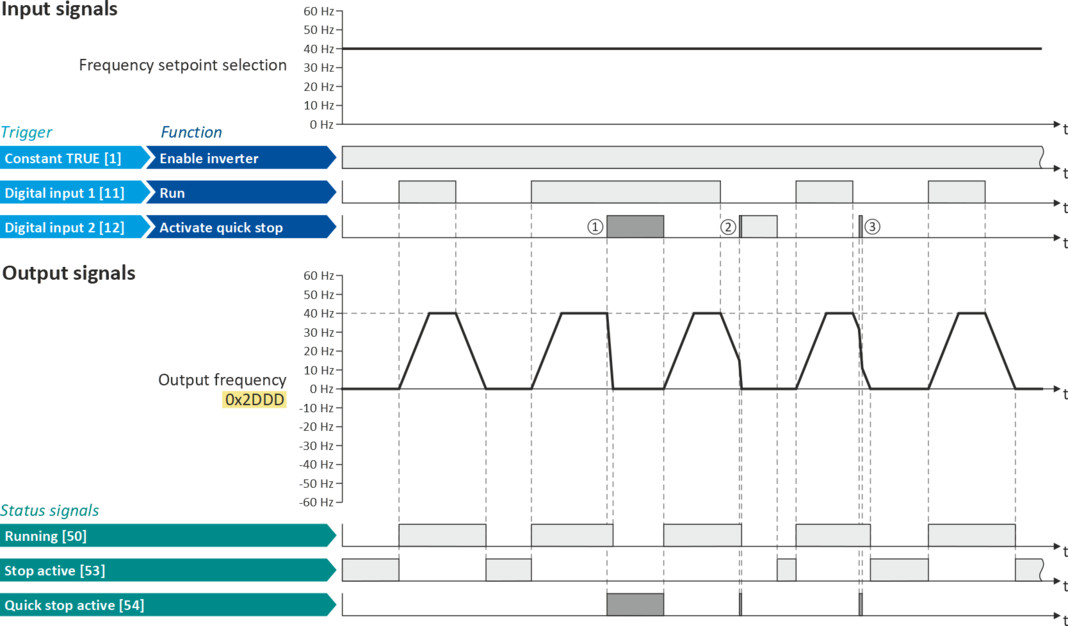
This example illustrates the "quick stop" function. If a quick stop is activated, the motor is brought to a standstill within the deceleration time set in 0x291C.
–
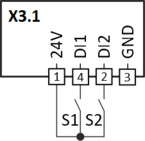
The switch S1 starts the motor in the forward direction of rotation. The switch S1 in the initial position stops the motor again.
–
The switch S2 activates the "quick stop" function.

Cancelling the quick stop causes a restart of the motor if the "Run” function is still active (switch S1 closed)!
|
Connection diagram
|
Function
|
||
|
|
|
Switch S1
|
Run
|
|
Switch S2
|
Activate quick stop
|
||
|
Parameter
|
Name
|
Setting for this example
|
|
Plug X3.1 configuration
|
DI2 + DI1 [1]
|
|
|
Enable inverter
|
Constant TRUE [1]
|
|
|
Run
|
Digital input 1 [11]
|
|
|
Activate quick stop
|
Digital input 2 [12]
|
|
|
Reset fault
|
Not connected [0]
|
|
|
Frequency control: Default setpoint source
|
Frequency preset 2 [12]
|
|
|
Frequency setpoint presets: Preset 2
|
40.0 Hz
|
|
|
Acceleration time 1
|
3.00 s
|
|
|
Deceleration time 1
|
3.00 s
|
|
|
Quick stop deceleration time
|
1.0 s
|
|
The status signals can be assigned to digital outputs.
 Configure digital outputs |
|
|
|
|
|
①
|
If a quick stop is activated, the motor is decelerated to the frequency setpoint 0 Hz within a short period of time. The "Quick stop active [54]" status is set as long as quick stop is activated. The "Stop active [53]" status is not set.
|
|
②
|
An active stop command is interrupted by a quick stop.
|
|
③
|
If quick stop is cancelled again before standstill is reached, stopping is continued with the stop method set in 0x2838:003. In the example: Stop with standard ramp.
|