Persistent variables
The technology module provides the possibility of persistently saving the parameters determined such as the winding diameter. For this purpose, the following setting has to be made in the »PLC Designer« for the technology module.

 How to create persistent variables in the »PLC Designer«:
Note!
This procedure does not apply to the Application Template, since it already provides structures for persistent data of the machine modules.
-
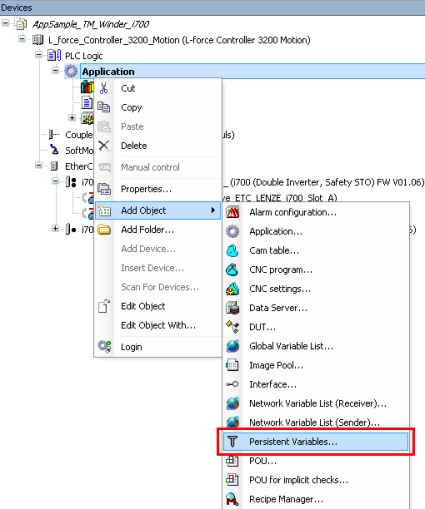
Add the global list for managing persistent variables in the context menu to
Application
with the
Add object
 Persistent variables...
command.
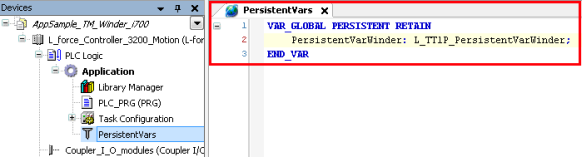
- Instance the reference of the persistent variables "L_TT1P_PersistentVarWinder" in the global structure of the persistent variables.
- Interconnect the instance of the persistent variables with the PersistentVar input.
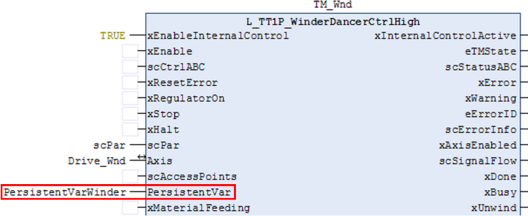
L_TW2P_PersistentVarWinder
Content of the persistent variables within the L_TW2P_PersistentVarWinder structure:
|
Identifier Data type |
Description |
|
|---|---|---|
|
IrDiam LREAL |
The diameter calculated
|
|
|
IrMaterialCounter LREAL |
Counter content of the material
|
|
|
liRevCounter LINT |
Number of revolutions counted for the material length counter
|
|
|
IrRevCounterResidual LREAL |
The fractional part of an incomplete revolution for the material length counter
|
|
|
xUpperPosTeached BOOL |
Referenced upper dancer limit position |
|
|
TRUE |
The upper dancer limit position has already been referenced. |
|
|
xLowerPosTeached BOOL |
Referenced upper dancer limit position |
|
|
TRUE |
The lower dancer limit position has already been referenced. |
|
|
xDancerUpperLimit LREAL |
The analog sensor value from the lrActDancerPosIn input for the upper dancer limit position. |
|
|
xDancerLowerLimit LREAL |
The analog sensor value from the lrActDancerPosIn input for the lower dancer limit position. |
|