Teaching function for dancer limit positions
|
Dancer in the lower limit position |
Dancer in the upper limit position |
|---|---|
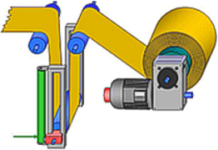
|
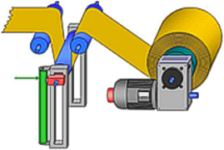
|

 How to execute the teaching manually:
Note: Limit positions already learned are overwritten when executing the teaching function.
-
Set xTeachDancerLimits parameter = TRUE
-
Move the dancer manually to the lower limit position so that a maximum of material is available in the dancer.
-
Set the xTeachLowerPos position = TRUE.
At rising edge (FALSE ä TRUE) the current input value lrActDancerPosIn is stored. If the input value is connected via the PersistentVar input, it is written to the Retain/Persistent memory in the lrDancerLowerLimit variable.
-
Move the dancer manually to the upper limit position so that a minimum of material is saved in the dancer.
-
Set the xTeachUpperPos input = TRUE.
At rising edge (FALSE ä TRUE) the current input value lrActDancerPosIn is stored. If the input value is connected via the PersistentVar input, it is written to the Retain/Persistent memory in the variable lrDancerUpperLimit .
-
After completing the teaching function, check the plausibility of the persistent variables.
To check the learned limit positions via the dancer position control:
-
Set the controller enable with xEnableOperation input = TRUE.
-
Activate the dancer position control with xDancerCtrl input = TRUE.
Note: The material must be at a standstill.
-
Set the scaled setpoint for the dancer position at lrSetDancerPosScaled input = 1.
-
Check whether the dancer has reached the upper limit position.
-
If the upper limit position has not been reached, the teaching function must be executed again.
-
-
Set the scaled setpoint for the dancer position at lrSetDancerPosScaled input = -1.
-
Check whether the dancer has reached the lower limit position.
-
If the lower limit position has not been reached, the teaching function must be executed again.
As an alternative to teaching, you can enter the respective input values manually into the parameters lrDancerUpperLimit and lrDancerLowerLimit .
Parameters to be set
|
Identifier Data type |
Description |
|
|---|---|---|
|
xTeachDancerLimits BOOL |
Source of the dancer position limitations
|
|
|
TRUE |
The limit positions lrDancerLowerLimit and lrDancerUpperLimit are used until the teaching function has been executed. After the teaching function has been executed manually, the saved limit positions from the teaching function are always used. |
|
|
FALSE |
The limit positions lrDancerLowerLimit and lrDancerUpperLimit are used. |
|
|
lrDancerUpperLimit LREAL |
Analog value for the upper dancer position limit
|
|
|
lrDancerLowerLimit LREAL |
Analog value for the lower dancer position limit
|
|
 L_TW2P_scPar_WinderDancerCtrlState
L_TW2P_PersistentVarWinder