Diameter calculation
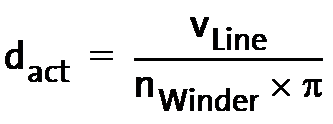
The current diameter is calculated by dividing the line velocity by the winder speed and the figure p:
|
Calculation of the current diameter |
||
|---|---|---|
|
|
||
|
Symbol |
Description |
Dimension unit |
|
dact |
Current diameter |
mm |
|
VLine |
Line velocity |
mm/s |
|
nWinder |
Winder speed |
rev/s |
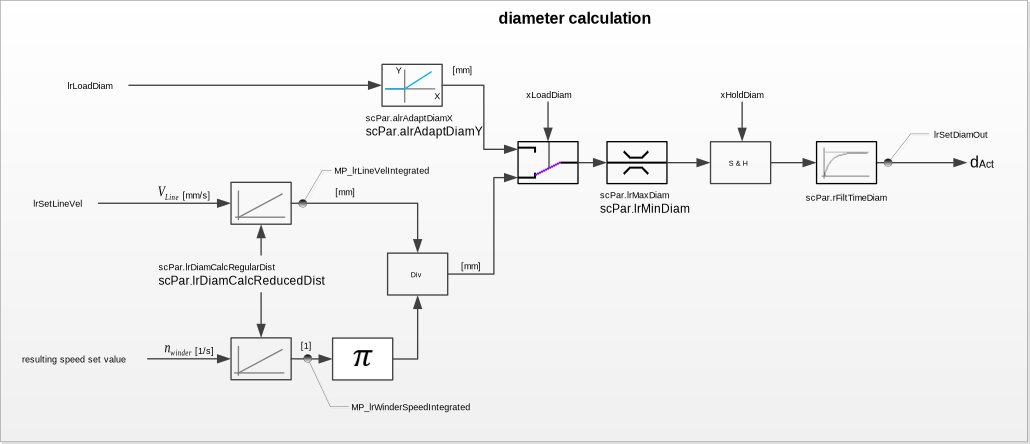
In fact, however, for the calculation integrated speed values are used instead of instantaneous values. This causes a average determination.
The number of revolutions causing a recalculation of the diameter is specified via the parameter lrDiamCalcRegularDist.
The initial value of this parameter is set to 1 winding shaft revolution.
Averaging can be extended to greater distances for thin materials and untidy reels. A lower calculation distance is specified in the lrDiamCalcReducedDist parameter. In this case, the initial value is 1/10 of a winder shaft rotation.
The integrated values used for the speed and the rotational speed are displayed via the measuring points MP_lrWinderSpeedIntegratedand MP_lrLineVelIntegrated. The integrated values are reset (MP_lrWinderSpeedIntegrated = 0 and MP_lrLineVelIntegrated = 0)
if the winder drive is deactivated or the diameter is loaded via xLoadDiam = TRUE.
With the reset of the integrated values the calculation of the diameter starts again. The following table summarizes the conditions for resetting the integrated values:
|
Condition |
Reset (Yes/No) |
Description |
|---|---|---|
|
lrSetLineVel < lrMinLineVel |
No |
Minimum line speed has not been reached |
|
xHoldDiam = TRUE |
No |
Hold current diameter |
|
lrSetLineVel < IrHystlineStandstill |
No |
Hysteresis value for the line speed - Standstill of the line is detected |
|
xLoadDiam = TRUE |
Yes |
Load diameter |
|
eTMState <> DANCECONTROL |
Yes |
The TM executes another function than winding.
|
For quick diameter changes of lrDiamCalcRegularDist, it can be switched to the fast calculation mode by setting the xDiamCalcReduced input = TRUE.
The lower calculation distance is set with the lrDiamCalcReducedDist parameter. Here, the initial value 1/10 is defined for the winder shaft revolution.
The smaller calculation distance is also activated automatically when a starting diameter is loaded. This state remains until a new diameter has been calculated.
The function is required if the real diameter of the reel may deviate significantly from the loaded diameter. Thus, the winder shaft only rotates for a short distance
with the "wrong" diameter. After the diameter has been calculated, a suitable value is available again.
The minimum (Min. diameter) and maximum diameter (Max. diameter) must be specified in the unit [mm] as the basic parameter.
These values function as limits. Furthermore, all percentage or scaled diameter values refer to Max. diameter.
Parameters to be set
The parameters for the diameter calculation are located in the parameter structure, see extract:
|
Identfier Data type |
Description |
|---|---|
|
lrMaxDiam LREAL |
Maximum diameter
|
|
lrMinDiam LREAL |
Minimum diameter
|
|
lrDiamCalcRegularDist LREAL |
Regular calculation distance for the diameter
|
|
lrDiamCalcReducedDist LREAL |
Reduced calculation distance for the diameter
|
See also: L_TW2P_scPar_WinderTensionCtrlState basic functions
Signal flow for calculating the diameter