Controller.OPCUAServer.GDS.Provisioning
The provisioning mode is used for the initial deployment of certificates on the server. In this mode the server will accept all client certificates although they aren’t trusted.
The Lenze OPC UA Server has the parameter 0x2471:129 for enabling the provisioning mode.
0. Disabled[default]
-
The provisioning mode is disabled.
1. Enabled Automatic:
-
The provisioning mode is only enabled if there is no trust list (trusted certificates) available.
- The provisioning mode is ended automatically if a trust list and CA signed certificate is deployed or one hour has passed.
2. Enabled Force
-
This provisioning mode stores the accepted certificates in the trust list..
-
This provisioning mode is always enabled after server restart.
-
The provisioning mode is ended automatically if a trust list and CA signed certificate is deployed.
-
Caution: This mode has to be deactivated by the setting parameter otherwise the mode will be enabled again after server restart.
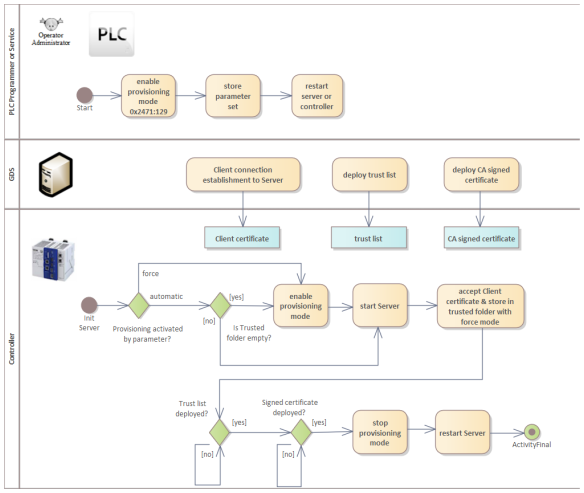
Activity Diagram
-
Is the provisioning mode active, the server will accept all client certificates!
-
Activate the user management to protect the server from unauthorized access.
- Publish just for the application necessary services (e.g. file system) and PLC variables.
-