IO-Link port 1
Analog input configuration for IO-Link port 1:
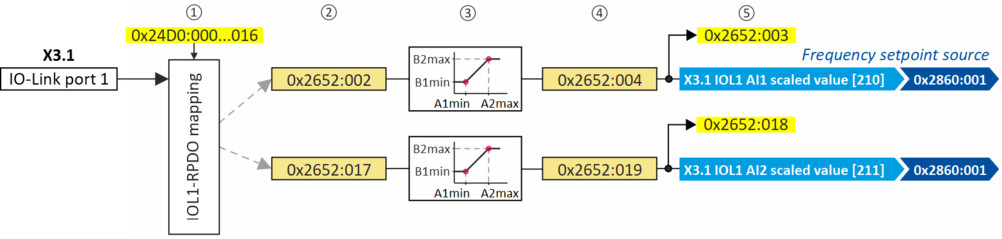
|
①
|
③
|
Scaling
|
⑤
|
Optional mapping of the scaled analog values to parameters of the inverter
|
|
|
②
|
Display of unscaled analog values
|
④
|
Display of scaled analog values
|
|
The analog inputs can not only be used as frequency setpoint source, but are also available for selection in other parameters.
Parameter
|
Address
|
Name / setting range / [default setting]
|
Information
|
|
|
0x2652:002
|
Analog input configuration: IOL1 AI1 source value
–
Read only
|
Parameter object that can be assigned to the process input data of IO-Link port 1 via the IOL1-RPDO mapping (0x24D0:001 ... 0x24D0:016).
–
Mapping entry = 0x265202xx (with xx = number of bits used)
|
|
|
0x2652:003
|
Analog input configuration: IOL1 AI1 target address
0 ... [0] ... 4294967295
|
||
|
0x2652:004
|
Analog input configuration: IOL1 AI1 scaled value
–
Read only
|
Display of the scaled value.
|
|
|
0x2652:005
|
Analog input configuration: IOL1 AI1 data type input
|
||
|
0
|
Signed
|
||
|
1
|
Unsigned
|
||
|
2
|
Float32
|
||
|
0x2652:006
|
Analog input configuration: IOL1 AI1 bits input
2 ... [16] ... 32
|
Number of the valid bits.
|
|
|
0x2652:007
|
Analog input configuration: IOL1 AI1 scaling #A1min
-2147483648 ... [0] ... 2147483647
|
Scaling
–
The data range depends on the data type (signed/unsigned) and the set number of valid bits.
|
|
|
0x2652:008
|
Analog input configuration: IOL1 AI1 scaling #A2max
-2147483648 ... [65535] ... 2147483647
|
||
|
0x2652:009
|
Analog input configuration: IOL1 AI1 data type output
|
||
|
0
|
Signed
|
||
|
1
|
Unsigned
|
||
|
0x2652:010
|
Analog input configuration: IOL1 AI1 bits output
2 ... [16] ... 32
|
Number of the valid bits.
|
|
|
0x2652:011
|
Analog input configuration: IOL1 AI1 scaling #B1min
-2147483648 ... [0] ... 2147483647
|
Scaling
–
The data range depends on the data type (signed/unsigned) and the set number of valid bits.
|
|
|
0x2652:012
|
Analog input configuration: IOL1 AI1 scaling #B2max
-2147483648 ... [65535] ... 2147483647
|
||
|
0x2652:015
|
Analog input configuration: IOL1 AI1 status
|
||
|
0
|
Inactive
|
||
|
1
|
Active
|
||
|
10
|
Error too less bits IN
|
||
|
11
|
Error too less bits OUT
|
||
|
12
|
Error too many bits IN
|
||
|
13
|
Error too many bits OUT
|
||
|
14
|
Error invalid min IN
|
||
|
15
|
Error invalid max IN
|
||
|
17
|
Error invalid max OUT
|
||
|
18
|
Error max smaller min IN
|
||
|
19
|
Error max smaller min OUT
|
||
|
20
|
Error invalid input mapping
|
||
|
21
|
Error invalid output mapping
|
||
|
0x2652:017
|
Analog input configuration: IOL1 AI2 source value
–
Read only
|
Parameter object that can be assigned to the process input data of IO-Link port 1 via the IOL1-RPDO mapping (0x24D0:001 ... 0x24D0:016).
–
Mapping entry = 0x265211xx (with xx = number of bits used)
|
|
|
0x2652:018
|
Analog input configuration: IOL1 AI2 target address
0 ... [0] ... 4294967295
|
||
|
0x2652:019
|
Analog input configuration: IOL1 AI2 scaled value
–
Read only
|
Display of the scaled value.
|
|
|
0x2652:020
|
Analog input configuration: IOL1 AI2 data type input
|
||
|
0
|
Signed
|
||
|
1
|
Unsigned
|
||
|
2
|
Float32
|
||
|
0x2652:021
|
Analog input configuration: IOL1 AI2 bits input
2 ... [16] ... 32
|
Number of the valid bits.
|
|
|
0x2652:022
|
Analog input configuration: IOL1 AI2 scaling #A1min
-2147483648 ... [0] ... 2147483647
|
Scaling
–
The data range depends on the data type (signed/unsigned) and the set number of valid bits.
|
|
|
0x2652:023
|
Analog input configuration: IOL1 AI2 scaling #A2max
-2147483648 ... [65535] ... 2147483647
|
||
|
0x2652:024
|
Analog input configuration: IOL1 AI2 data type output
|
||
|
0
|
Signed
|
||
|
1
|
Unsigned
|
||
|
0x2652:025
|
Analog input configuration: IOL1 AI2 bits output
2 ... [16] ... 32
|
Number of the valid bits.
|
|
|
0x2652:026
|
Analog input configuration: IOL1 AI2 scaling #B1min
-2147483648 ... [0] ... 2147483647
|
Scaling
–
The data range depends on the data type (signed/unsigned) and the set number of valid bits.
|
|
|
0x2652:027
|
Analog input configuration: IOL1 AI2 scaling #B2max
-2147483648 ... [65535] ... 2147483647
|
||
|
0x2652:030
|
Analog input configuration: IOL1 AI2 status
|
||
|
0
|
Inactive
|
||